How to Fix “URL is Unknown to Google” in Google Search Console (Complete SEO Guide)

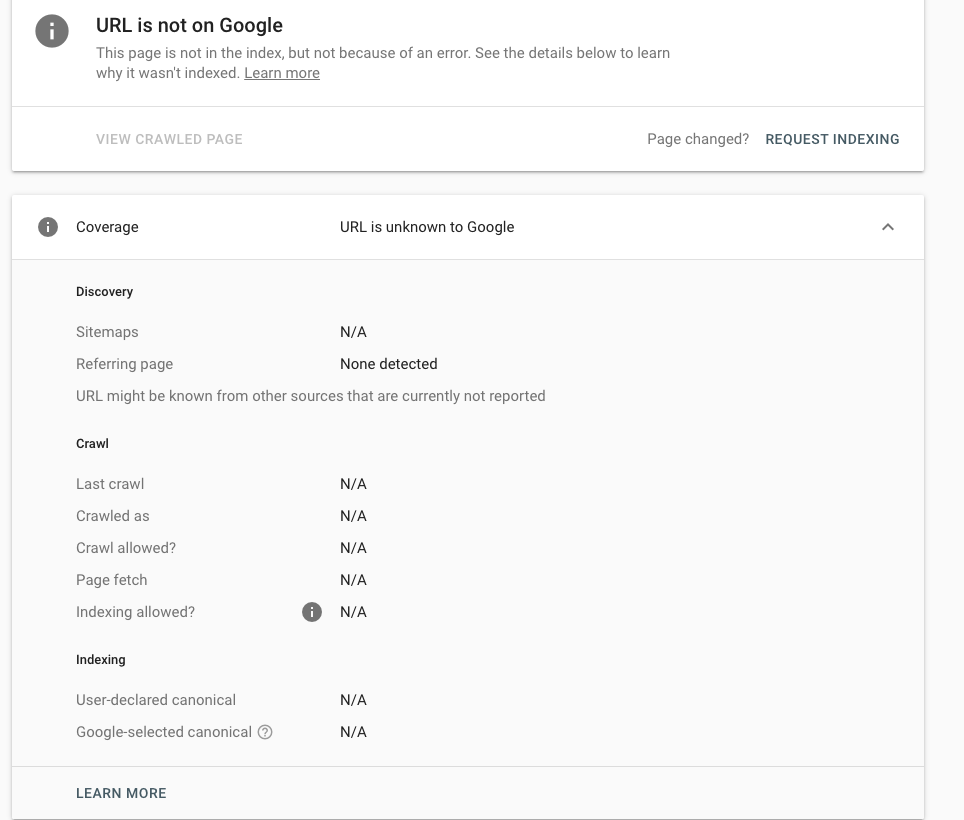
Don't worry if you see this type of indexing problem while indexing your sites in Google Search Console. If your page shows “Page is not indexed: URL is unknown to Google” in Google Search Console, it means Google has not discovered or processed your page yet.
This is one of the most common indexing issues for:
- New websites
- Recently published blog posts
- Newly added pages
- Updated articles
- Low-authority websites
In my experience, almost every website owner, developer, or blogger encounters this issue at some point. The good news is that, in most cases, it can be fixed easily with proper technical SEO and indexing optimization.
In this article, I’m Farindra Bhandari, and I’ll guide you through the complete process of fixing this indexing issue in Google Search Console.
Before we begin, we’ll cover:
- What “URL is unknown to Google” actually means
- Why Google Cannot Discover Your URL
- Step-by-step methods to fix the problem
- Best SEO practices to help pages get indexed faster
- Common technical mistakes developers should avoid
By the end of this guide, you’ll clearly understand how Google indexing works and how to improve your website’s visibility in search results.
What Does “URL is Unknown to Google” Mean?
When Google Search Console shows:
Page is not indexed: URL is unknown to Google
It means Google’s crawler has not found the URL in its system yet.
This usually happens when:
- The page is new
- No internal links point to the page
- Sitemap is missing
- Robots.txt blocks crawling
- The website has weak SEO structure
- Google has not crawled the site yet
This issue is very common on:
- New blog posts
- Fresh websites
- Dynamically generated pages
- Poorly linked pages
- Websites with low authority
Why Google Cannot Discover Your URL
This indexing problem is one of the most common problems worldwide. This indexing problem is affected by many reasons.
1. Missing XML Sitemap
XML Sitemap is also one of the most common factors that result in "URL Unknown to Google". An XML sitemap helps Google discover website pages quickly.
If there is no XML Sitemap on your website, then Google may take a long time to find new URLs.
Example:
https://example.com/sitemap.xml
XML Sitemap includes the important pages like;
- Blog posts.
- Important pages
- Product pages
- Categories
- Dynamic routes
2. No Internal Linking
Internal Linking is the connection or creating a hyperlink that connects different pages of the same site. It enhances SEO by helping search engines crawl, index, and understand website structure, while simultaneously improving user navigation and engagement.
Example:
Read More: How Server location affects website performance & SEO
Internal Linking is one of the fastest ways to improve indexing.
3. Robots.txt Blocking the URL
It is a plain text file placed in a website's root directory that tells search engine crawlers and AI bots which pages or files they are permitted to request or ignore. It is used primarily to manage site crawl traffic and prevent server overload.
Sometimes Robots.txt can also block the URL
Bad example:
Disallow: /blog/
This prevents Google from crawling blog pages.
Correct & SEO Friendly Robots.txt file
User-Agent: *
Allow: /

Disallow: /api/
Disallow: /admin/
Disallow: /dashboard/

Sitemap: https://example.com/sitemap.xml
4. Noindex Meta Tag
Noindex is also a main cause of indexing problems. If you want to rank your post on Google Search Engine or any other search engine, the page must always have an index meta tag. Google and other search engines index only pages that have an index meta tag. Otherwise, Google Search Console may show an indexing problem, such as "URL is unknown in Google" or another indexing issue.
Good Example:
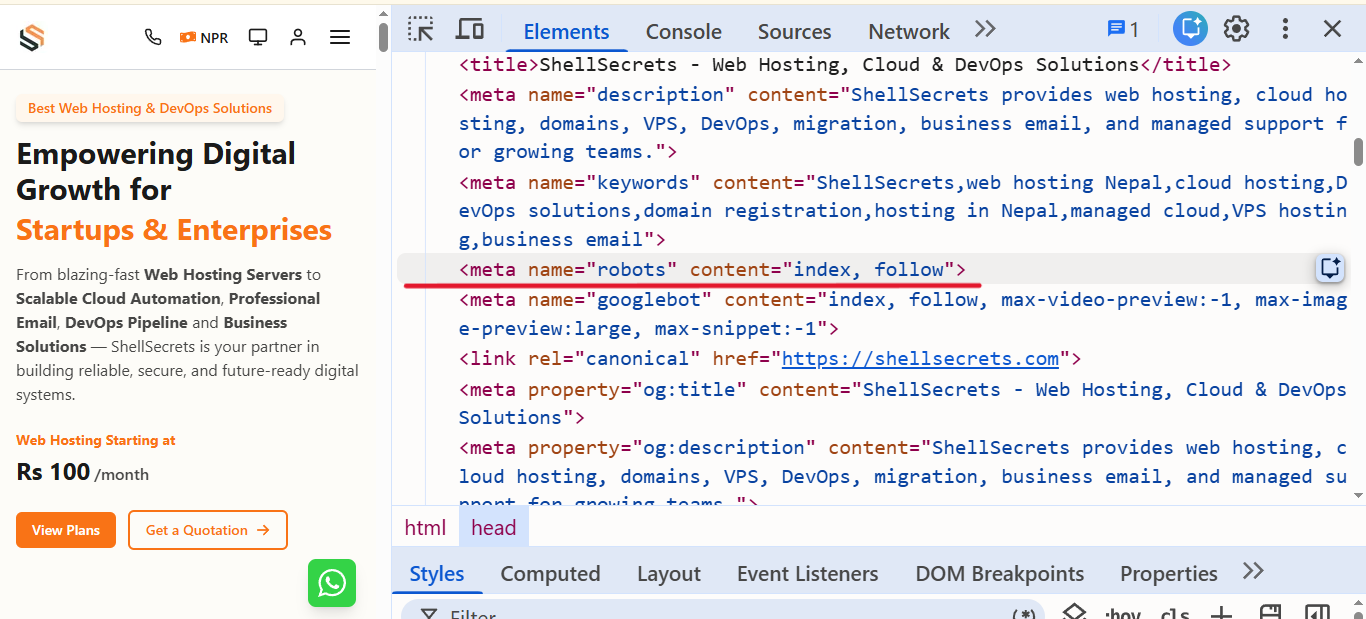
Bad Example:
<meta name="robots" contents="noindex, nofollow"/>
5. Weak Website Authority
Website Authority is the method of describing the overall "strength," credibility, and ranking potential of a website's domain. It is primarily determined by the quantity and quality of external websites linking back to it, which are known as backlinks.
Several important SEO factors, including content quality, page quality, backlinks, internal linking, and external linking, mainly influence Website Authority or domain authority. These elements help search engines understand the trust, relevance, and overall authority of a website. A well-structured website with high-quality content and strong linking practices is more likely to gain better visibility and faster indexing in search results.
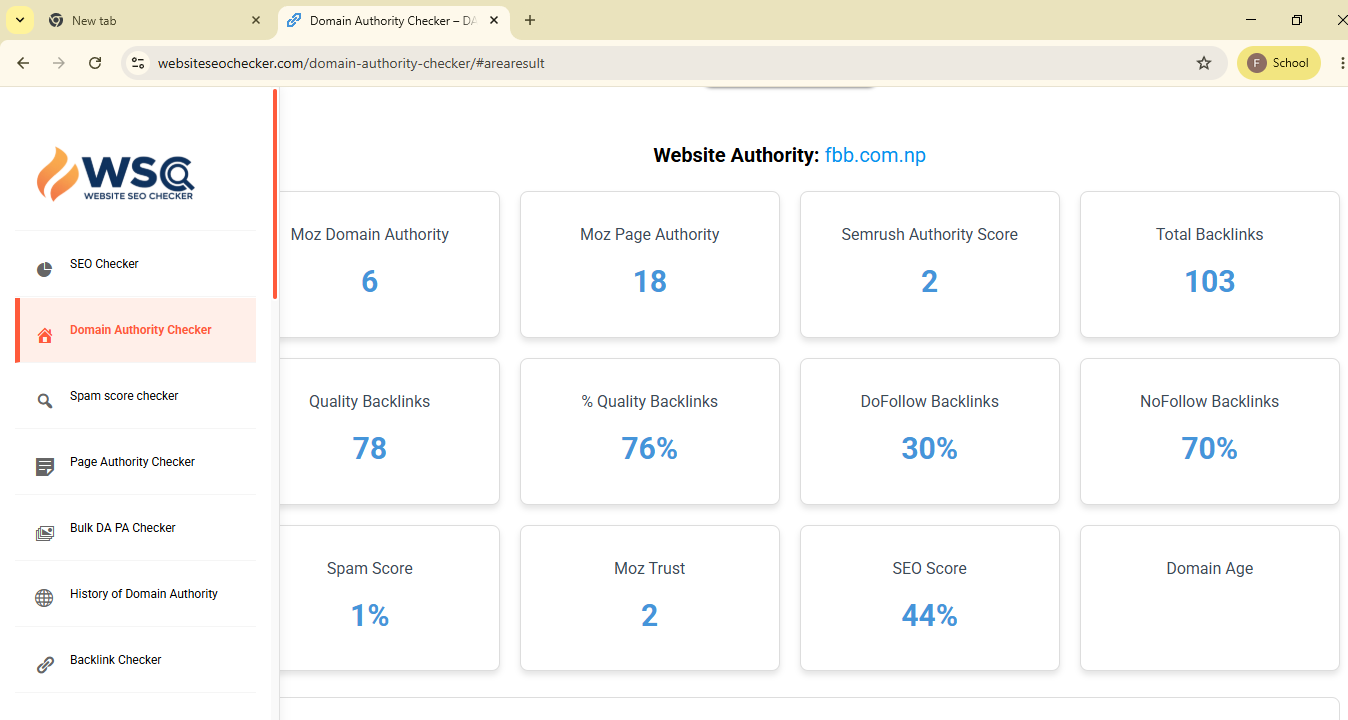
Check your Website Authority: Ahrefs
To improve website authority :
- Publish quality content regularly
- Build High Quality backlinks
- Improve technical SEO
- Increase internal linking
- Improve page speed
Step-by-Step Fix for “URL Unknown to Google”
Step 1 — Inspect URL in Google Search Console
Then:
- Paste your URL in the above search box or click on URL Inspection
- Click Enter
- Check indexing status
If Google says:
URL is unknown to Google
Continue with the next steps.
Step 2 — Submit URL for Indexing
Click:
Request Indexing
Google will add the page to its crawl queue.
This does not guarantee instant indexing, but it helps discovery.
Step 3 — Add URL to Sitemap
Ensure the page exists in:
/sitemap.xmlto
Then submit the sitemap to Google Search Console.
Example:
https://example.com/sitemap.xml
Step 4 — Improve Internal Linking
Add links from:
- Homepage
- Existing blog posts
- Categories
- Popular pages
Step 5 — Check robots.txt
Visit:
https://example.com/robots.txtMake sure important pages are not blocked.
Step 6 — Remove Noindex Tags
Search page source for:
noindex change it index
If found, remove it.
Step 7 — Improve Content Quality
Thin or duplicate content may not get indexed.
Google prefers:
- Unique content
- Helpful information
- Original insights
- Good formatting
- Fast-loading pages
Recommended:
- 1000+ words
- Proper headings
- Images
- Internal links
- External references
Technical SEO Checklist for Faster Indexing
Use Proper Heading Structure
Correct:
<h1>Main Title</h1><h2>Section</h2><h3>Subsection</h3>Optimize Website Speed
Slow websites reduce crawl efficiency.
Improve:
- Image optimization
- Server response time
- CDN usage
- Caching
- Minification
Tools:
Use Canonical Tags
Correct canonical example:
<link rel="canonical" href="https://example.com/blog/post">This prevents duplicate content issues.
Use Structured Data
Schema markup helps Google understand content.
Example:
{
   "@context": "https://schema.org",
   "@type": "BlogPosting",
   "headline": "How to Fix URL Unknown to Google"
}
Common Developer Mistakes That Prevent Indexing
Blocking Crawlers Accidentally
Example:
Disallow: /
This blocks the entire website.
Using JavaScript Without SSR
Heavy client-side rendering can delay indexing.
Recommended:
- Server-side rendering
- Static generation
- Hybrid rendering
Frameworks like Next.js help improve SEO.
Broken Internal Links
Broken links waste crawl budget.
Check regularly using:
How Long Does Google Take to Index a Page?
Indexing time depends on:
- Website authority
- Crawl budget
- Content quality
- Internal links
- Technical SEO
Typical timeline:
Best Practices to Get Indexed Faster
Publish High-Quality Content
Google indexes useful content faster.
Focus on:
- Originality
- User intent
- Detailed explanations
- Helpful examples
Share Content Externally
Promote URLs on:
- Social media
- Forums
- Communities
- Backlinks
- Newsletters
External signals help discovery.
Keep Updating Old Content
Fresh content gets crawled more often.
Update:
- Statistics
- Screenshots
- Examples
- SEO structure
Final Conclusion
The “URL is unknown to Google” issue usually means Google has not discovered your page yet — not necessarily that your website is penalized.
Most indexing problems can be fixed by:
- Submitting sitemap
- Improving internal links
- Removing crawl blocks
- Optimizing technical SEO
- Publishing quality content
If your website has proper structure, fast loading speed, and strong internal linking, Google will usually index pages much faster.
For developers and SEO professionals, indexing optimization is one of the most important parts of technical SEO because even great content cannot rank if Google cannot discover it.
Frequently Asked Questions (FAQ)
What does “URL is unknown to Google” mean in Google Search Console?
It means Google has not discovered or processed the URL yet. The page is not in Google’s indexing system, so it cannot appear in search results.
How do I fix “URL is unknown to Google”?
You can fix it by:
- Submitting the URL in Google Search Console
- Adding the page to XML sitemap
- Improving internal linking
- Removing
noindextags - Checking robots.txt rules
- Publishing quality content
How long does Google take to index a page?
Indexing can take:
- Minutes to hours for authority websites
- 1–7 days for medium websites
- Several weeks for new websites
The timing depends on website authority, crawl budget, and technical SEO.
Can robots.txt block indexing?
Yes. If your robots.txt file blocks crawling, Google cannot access the page.
Bad example:
Disallow: /blog/
Always verify robots.txt configuration carefully.
Does internal linking help indexing?
Yes. Internal links help Google discover pages faster.
Adding links from:
- Homepage
- Blog category pages
- Related articles
- Navigation menus
can significantly improve indexing speed.
Why is my sitemap important for SEO?
Sitemap is important for SEO because it help in crawlability, Indexing speed, Website structure understanding
Can low-quality content prevent indexing?
Yes. Thin, duplicate, or low-value content may not get indexed
Can JavaScript websites have indexing issues?
Yes. Heavy client-side rendering may delay indexing.
Frameworks like Next.js with SSR or static generation are more SEO-friendly.
Should I request indexing manually?
Yes. After publishing a new page, using “Request Indexing” in Google Search Console can help Google discover the URL faster.