CVE-2026-123158: OpenSSH Authentication Bypass Lets Attackers Log In Without Knowing a Password
An unusually long password can bypass OpenSSH authentication on certain Linux systems. Explore the vulnerability, affected configurations, and urgent fixes.

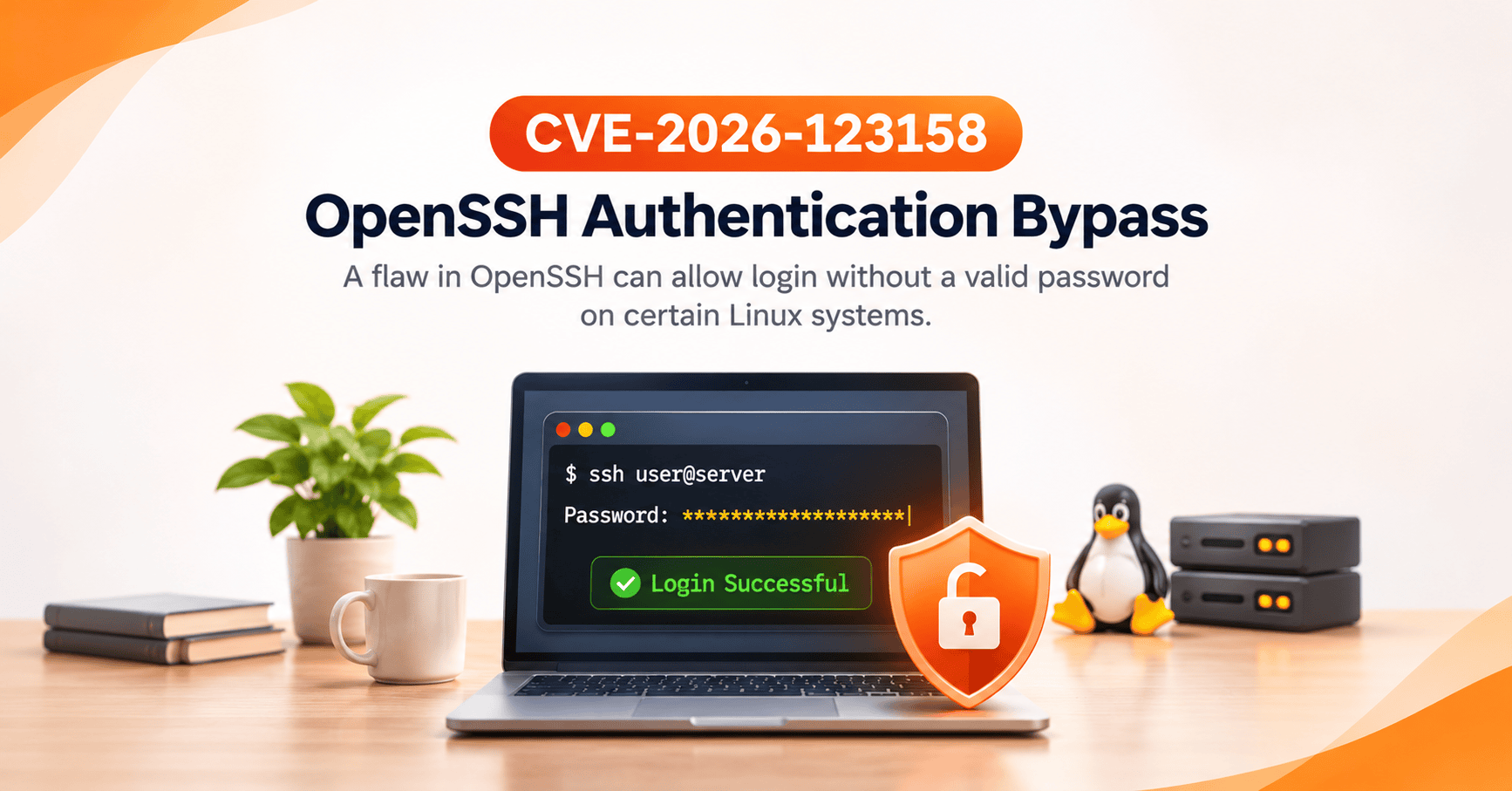
What if a password that should never work could unlock a Linux server?
For years, administrators have relied on SSH keys and passwordless accounts to protect critical infrastructure. But a newly disclosed vulnerability demonstrates how an unexpected interaction between software components can undermine those protections.
CVE-2026-123158, nicknamed *sshole, is a high-severity OpenSSH authentication bypass affecting certain Linux systems using the musl C library without Pluggable Authentication Modules (PAM).
Under specific conditions, an attacker can authenticate to an account without knowing its password by submitting an unusually long password string.
The vulnerability was disclosed on November 5, 2026, by security researcher Özgün Kültekin of Wakefield. It carries a CVSS v3.1 score of 8.1 (High) and prompted an urgent security workaround in Portable OpenSSH 10.6p2.
Alpine Linux, a widely used lightweight Linux distribution, has confirmed that its standard OpenSSH server configuration can be affected and has released patched packages.
More concerningly, security researchers have already reported successful exploitation against an instrumented Alpine Linux honeypot.
For DevOps engineers, server administrators, and organizations managing SSH-accessible infrastructure, this vulnerability deserves immediate attention.
What Is CVE-2026-123158?
CVE-2026-123158 is a password authentication bypass in the OpenSSH server (sshd) that occurs on certain Linux systems using musl libc with PAM disabled.
OpenSSH provides encrypted remote access for server administration, file transfers, automated deployments, and infrastructure management.
Unlike vulnerabilities that target encryption algorithms or expose private keys, this flaw affects the authentication process itself.
An attacker does not need to decrypt SSH traffic, steal credentials, or crack a password hash.
Instead, the vulnerability arises when a password verification error is incorrectly interpreted as a successful authentication.
Vulnerability Overview
| Property | Details |
|---|---|
| CVE ID | CVE-2026-123158 |
| Nickname | *sshole / SSHole |
| Affected Component | OpenSSH Server (sshd) |
| Disclosure Date | November 5, 2026 |
| Discoverer | Özgün Kültekin, Wakefield |
| Severity | High |
| CVSS v3.1 | 8.1 |
| Attack Vector | Network |
| Authentication Required | No prior authentication |
| Potential Impact | Unauthorized remote account access |
| Relevant Environment | musl libc without PAM |
| Upstream Fix | Portable OpenSSH 10.6p2 |
Important: Not every Linux server running OpenSSH is vulnerable. Exploitation requires a specific combination of operating system, authentication settings, and account configuration.
How Does the OpenSSH Authentication Bypass Work?
The most unusual aspect of CVE-2026-123158 is that it turns a failed password verification operation into a successful login.
To understand why, we need to examine how Linux represents accounts without usable passwords.
Understanding Passwordless Linux Accounts
Linux commonly stores local password information in /etc/shadow.
An account with a valid password typically has a cryptographic password hash in its password field.
However, accounts configured without a usable password may contain a special marker, such as an asterisk (*).
For example:
deploy:*:...
This normally indicates that password authentication should not succeed for the account.
Such accounts may still be accessible through SSH public-key authentication, making this configuration common for deployment users and automated services.
The problem begins when another software component uses the same character to indicate an error.
When an Error Looks Like a Valid Password Match
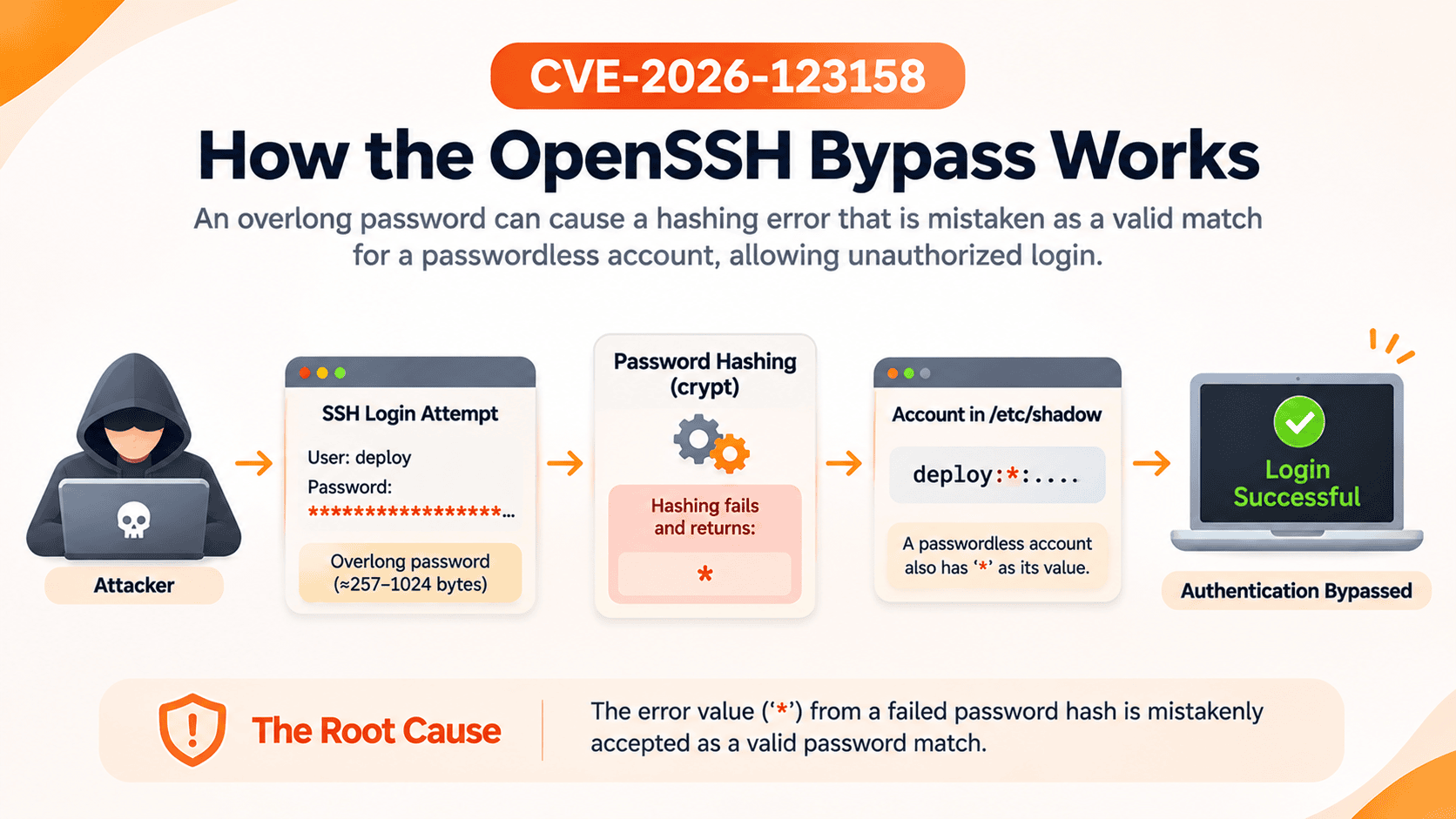
On affected musl-based systems, the password hashing function crypt() can return an asterisk when it cannot process certain password inputs.
An unusually long password is one condition that can trigger this behavior.
This creates a dangerous collision:
- The account's stored password field contains
*, meaning no usable password. - The password verification function returns
*after failing to process the supplied password. - The vulnerable authentication path can mistakenly interpret the matching values as successful verification.
A failed password hashing operation can therefore become an authentication bypass.
The vulnerability is not caused by weak passwords or broken SSH encryption. It is an authentication logic failure involving the interpretation of error values.
How an Attack Could Unfold
Consider an affected Alpine Linux server with SSH password authentication enabled.
An attacker who can reach its SSH service and knows the name of a suitable account may attempt authentication using an unusually long password.
Alpine's advisory identifies password lengths of approximately 257–1024 bytes as relevant to the reported behavior.
Under the vulnerable conditions, the password verification process can return the same marker stored for an account without a usable password.
Instead of rejecting the attempt, the SSH server may grant access.
The attacker does not need the account's legitimate credentials.
However, the server must satisfy additional conditions, including the presence of another local account with a compatible password hash.
This is why the vulnerability is serious but not universally exploitable.
Which Linux Systems Are Affected?
The vulnerability primarily concerns OpenSSH installations using musl libc without PAM.
Alpine Linux
Alpine Linux is a prominent affected platform because it uses musl libc and its standard openssh-server package is built without PAM.
According to Alpine's official advisory, exploitation requires:
- An affected OpenSSH server using musl libc without PAM protection.
- SSH password authentication enabled.
- An account whose password field contains
*. - At least one other local account using a
$5$or$6$password hash. - Network access to the SSH service and knowledge of a suitable username.
A server without these conditions may not be vulnerable to the reported attack.
Other Potentially Affected Environments
Custom musl-based Linux systems may also require investigation, including embedded devices, network appliances, and specialized server environments.
Distributions and build systems such as OpenWrt, Buildroot, and Yocto may use relevant components, but their actual exposure depends on how OpenSSH and authentication are configured.
The use of musl alone does not establish vulnerability.
Are Debian, Ubuntu, and Red Hat Affected?
Standard Debian, Ubuntu, and Red Hat Enterprise Linux deployments generally use glibc rather than musl libc.
Red Hat explicitly confirms that its products are unaffected because their OpenSSH builds use glibc and PAM.
Custom OpenSSH builds should be assessed independently, regardless of distribution name.
Why Is CVE-2026-123158 Dangerous?
Authentication is one of the most important security boundaries on any server.
When that boundary fails, an attacker may obtain access that should have required valid credentials.
Unauthorized SSH Access
A successful attacker may gain access to an affected account without possessing its password or SSH private key.
The resulting permissions depend on the compromised account.
An ordinary user account might expose application files or provide an initial foothold. A privileged account could enable substantially greater control.
Potential Privilege Escalation
Some Alpine configurations include accounts with administrative privileges through tools such as doas.
If an attacker gains access to an affected account with elevated permissions, the impact could extend to system-wide compromise.
However, the vulnerability does not automatically grant root access on every affected server.
OpenSSH normally restricts direct root password authentication through PermitRootLogin prohibit-password.
Root compromise depends on the target account's privileges and the system's configuration.
Risks to Cloud and DevOps Infrastructure
SSH is widely used for managing VPS instances, cloud servers, deployment pipelines, backup systems, and production applications.
A compromised account could potentially expose:
- Application configuration and sensitive files
- Deployment credentials and API keys
- Source code and automation scripts
- Accessible databases and services
- Privileged administrative operations
The vulnerability is particularly concerning for accounts intended to accept SSH keys but never passwords.
Has CVE-2026-123158 Been Exploited in the Wild?
Yes, there is public reporting of observed exploitation.
On November 6, 2026, Help Net Security reported that threat intelligence company Previdian had detected exploitation attempts shortly after disclosure.
Previdian also reported confirming successful root access against one of its instrumented Alpine Linux honeypots.
That provides evidence of successful exploitation in a controlled, monitored environment.
However, it does not establish how many production systems have been compromised.
Administrators should treat the vulnerability as an active threat without assuming that every exposed server has already been attacked.
How to Check Whether Your Server Is Vulnerable
Administrators should evaluate the operating system, OpenSSH package, authentication configuration, and account settings.
Step 1: Identify Your Linux Distribution
cat /etc/os-release
If the system runs Alpine Linux or another musl-based distribution, investigate further.
Step 2: Check the OpenSSH Package
On Alpine Linux:
apk info -v openssh
apk info -v openssh-server
Compare the installed package version with the fixed version for your Alpine release.
Remember that distributions may backport fixes into older upstream OpenSSH versions.
Step 3: Inspect SSH Authentication Settings
Run:
sudo sshd -T | grep -Ei \
'passwordauthentication|usepam|permitrootlogin'
A relevant configuration includes:
passwordauthentication yes
usepam no
This combination requires further investigation on musl-based systems.
SSH Match blocks can override settings for individual users or connections, so administrators should also review applicable configuration rules.
Step 4: Review Account Configuration
Authorized administrators should inspect account configurations for passwordless accounts and compatible local password hashes.
The /etc/shadow file contains sensitive information. Avoid copying its contents into tickets, public reports, or shared logs.
Also determine whether affected accounts have administrative permissions or access to sensitive infrastructure.
How to Fix CVE-2026-123158
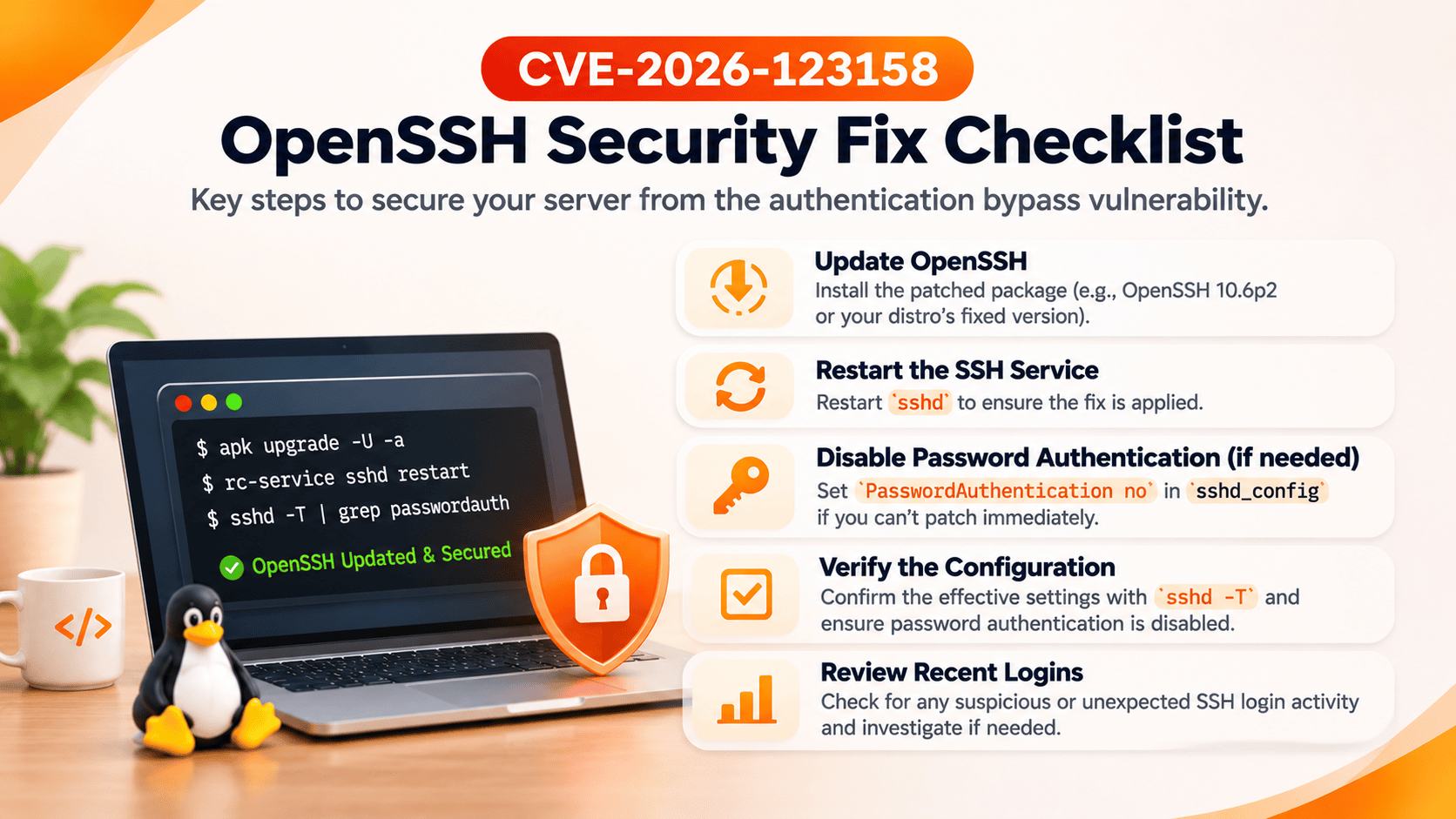
The recommended solution is to install the patched OpenSSH package and restart the SSH daemon.
Method 1: Update OpenSSH on Alpine Linux
Alpine recommends:
sudo apk upgrade -U -a
If already logged in as root, omit sudo.
After installing the update, restart SSH:
sudo rc-service sshd restart
Restarting sshd is essential. Upgrading the package alone does not guarantee that the running daemon has loaded the patched executable.
Before restarting SSH on a remote production server, verify that you have working administrative access and preferably an alternative console connection.
Alpine Linux Fixed Versions
The following versions are identified in Alpine's security advisory:
| Alpine Release | Fixed OpenSSH Version |
|---|---|
| edge | 10.6_p2-r0 |
| 3.24 | 10.3_p1-r2 |
| 3.23 | 10.2_p1-r1 |
| 3.22 | 10.0_p1-r11 |
| 3.21 | 9.9_p2-r1 |
| 3.20 | 9.7_p1-r6 |
| 3.19 | 9.6_p1-r3 |
| 3.18 | 9.3_p2-r4 |
| 3.17 | 9.1_p1-r7 |
| 3.16 | 9.0_p1-r6 |
Older Alpine branches may no longer receive regular security maintenance. Where possible, migrate to a supported release.
Method 2: Disable SSH Password Authentication
If immediate patching is not possible, disable password authentication.
First, confirm that SSH key authentication works and keep an existing administrative session open.
Edit the SSH server configuration:
sudo vi /etc/ssh/sshd_config
Ensure the effective configuration contains:
PasswordAuthentication no
Check included configuration files and relevant Match blocks for overrides.
Validate the configuration:
sudo sshd -t
Then restart SSH:
sudo rc-service sshd restart
Verify:
sudo sshd -T | grep -i passwordauthentication
Expected output:
passwordauthentication no
Test a new key-based SSH connection before closing your existing session.
Method 3: Restrict SSH Exposure
Where practical, limit SSH access to trusted administrative networks through firewalls, VPNs, or dedicated management interfaces.
This reduces exposure but does not replace patching.
Method 4: Verify and Monitor
After remediation, confirm that the patched package is installed and the running SSH daemon has been restarted.
Review recent authentication logs for unexpected successful logins, unfamiliar source addresses, and unusual activity involving privileged or key-only accounts.
If compromise is suspected, preserve evidence and investigate using trusted tools.
What This Vulnerability Teaches Us About Infrastructure Security
CVE-2026-123158 demonstrates that security failures can emerge from interactions between components that appear safe individually.
A passwordless account may be configured correctly. SSH encryption may work correctly. Yet an unexpected return value from a lower-level library can undermine authentication.
For DevOps teams and infrastructure administrators, three lessons stand out.
SSH Keys Do Not Automatically Disable Password Login
Using SSH keys is good security practice, but it does not necessarily mean password authentication is disabled.
Administrators should explicitly verify which authentication methods the SSH server accepts.
Minimal Systems Still Need Security Maintenance
Lightweight Linux distributions reduce complexity and resource consumption, but they are not immune to security vulnerabilities.
Differences in C libraries, authentication modules, and package configurations can introduce unique risks.
Installing a Patch Is Not Always the Final Step
Long-running services may continue using vulnerable code until restarted.
Reliable patch management should include package updates, service restarts, configuration verification, and monitoring.
Frequently Asked Questions
What is CVE-2026-123158?
CVE-2026-123158 is a high-severity OpenSSH password authentication bypass affecting certain Linux systems using musl libc without PAM. Under specific conditions, attackers can access accounts without knowing their passwords.
Does this vulnerability affect every Linux server?
No. Exploitation requires a specific combination of musl libc, PAM-disabled OpenSSH, enabled password authentication, and qualifying account configurations.
Is Alpine Linux affected?
Yes. Alpine Linux has confirmed that its standard OpenSSH server configuration can be affected and has published patched packages for multiple release branches.
Are Ubuntu, Debian, and Red Hat affected?
Standard glibc-based deployments are not affected by the reported musl-specific flaw. Red Hat explicitly confirms its products are unaffected. Custom OpenSSH builds should be assessed separately.
Can attackers gain root access through CVE-2026-123158?
Potentially, depending on account privileges and SSH configuration. The vulnerability does not automatically provide root access on every affected server. Successful root access has been reported against an instrumented Alpine Linux honeypot.
Does disabling password authentication prevent exploitation?
Yes. Setting PasswordAuthentication no and ensuring the running SSH daemon uses that configuration prevents this particular password authentication bypass.
Is OpenSSH 10.6p2 the only available fix?
No. OpenSSH 10.6p2 includes the upstream workaround, while Linux distributions such as Alpine have backported fixes into their own packages. Follow your distribution's official security advisory.
Do I need to restart SSH after patching?
Yes. Alpine specifically instructs administrators to restart sshd after upgrading because the existing daemon may continue running vulnerable code.
Final Thoughts: When a Failed Password Check Opens the Door
CVE-2026-123158 is a reminder that security failures do not always require sophisticated cryptographic attacks or stolen credentials.
Sometimes, a simple error value interpreted incorrectly can undermine an entire authentication process.
For affected Linux systems, the immediate priorities are clear: patch OpenSSH, restart the SSH daemon, verify authentication settings, and review potentially exposed accounts.
For organizations managing cloud servers, VPS infrastructure, and automated deployments, the broader lesson is equally important.
Security should never depend on assumptions about how individual components behave. It requires configuration verification, timely patching, privilege separation, and continuous monitoring.
At ShellSecrets, we believe reliable infrastructure begins with secure foundations, proactive maintenance, and carefully managed access.
Whether you're operating a single Linux server or maintaining distributed production infrastructure, protecting the mechanisms that control access is essential.
Patch promptly. Verify your configuration. Never assume an account is secure simply because it has no password.