Java4Shell (CVE-2026-114938): Is Your Java Server Vulnerable?
A serious Java runtime vulnerability could expose certain servers to remote attacks. Learn how to identify affected workloads and patch them safely.

A Java application can run reliably for years without anyone paying much attention to the runtime underneath it. Dependencies get updated, containers are rebuilt, and deployment pipelines keep moving. The Java Virtual Machine (JVM) is often treated as a stable part of the infrastructure.
That assumption deserves another look.
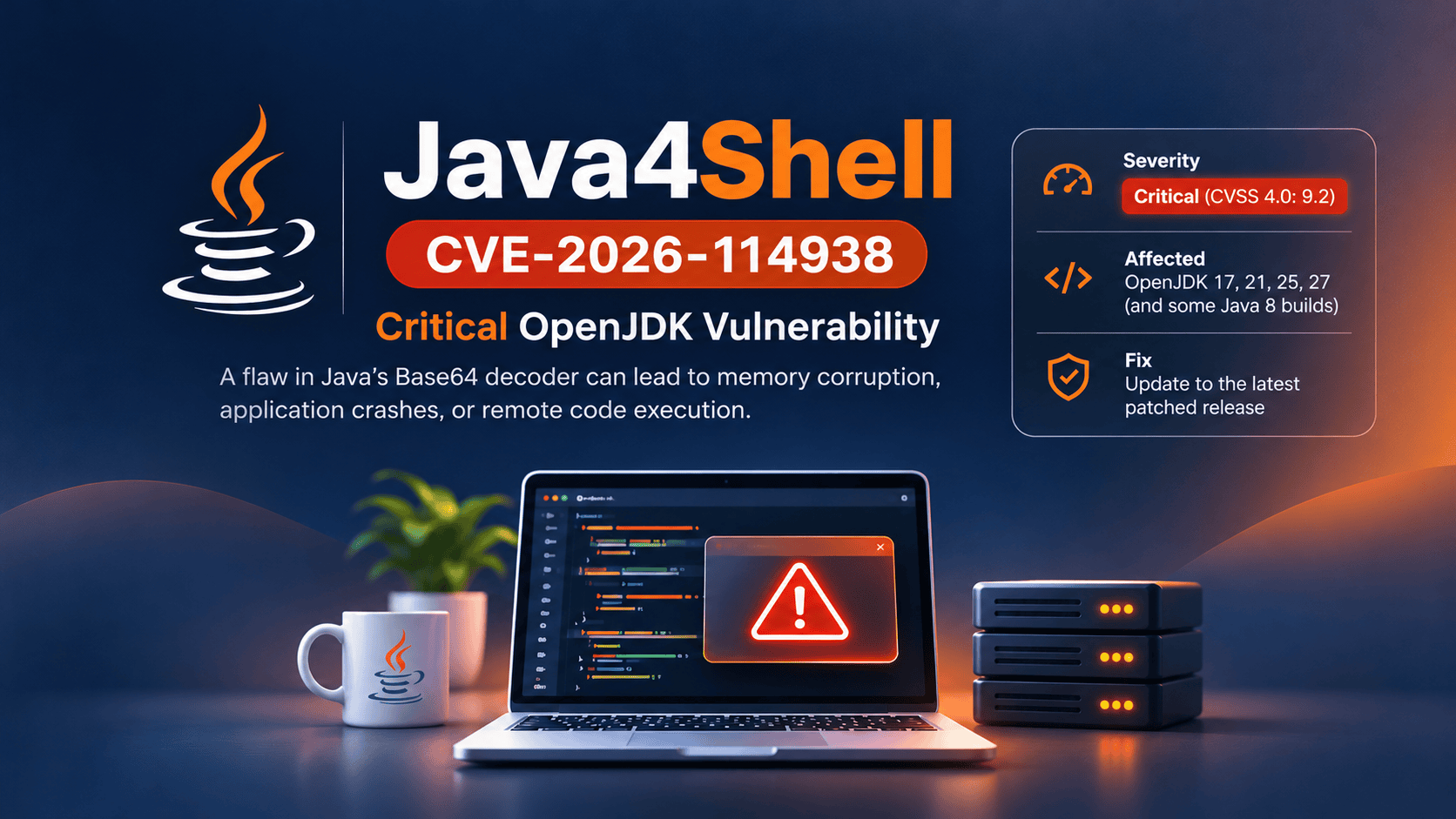
On November 17, 2026, a serious OpenJDK vulnerability was publicly disclosed under CVE-2026-114938, also known as Java4Shell. The flaw affects an optimized Base64 decoding routine in certain Java runtimes and can lead to memory corruption, application crashes, and potentially remote code execution.
The concerning part is that exploitation may not require authentication. Under the right conditions, an attacker could trigger the vulnerable code by supplying specially crafted data to an application.
However, there's an important distinction: not every Java installation is vulnerable, and not every affected Java version is exploitable on every server.
The risk depends on the Java runtime, the underlying CPU, and how the application processes untrusted input.
For sysadmins, DevOps engineers, and platform teams, the immediate priority is to identify which workloads meet those conditions and update them before they become an easy target.
What Is CVE-2026-114938?
CVE-2026-114938 is a memory corruption vulnerability in the Base64 decoding implementation used by the OpenJDK HotSpot JVM.
Base64 is a common encoding format used to represent binary data as text. Java applications encounter it in authentication headers, tokens, API requests, file uploads, and many other places.
Normally, decoding Base64 data is a routine operation. An application receives an encoded value, decodes it, and continues processing.
For performance, Java can use CPU-specific instructions to accelerate certain operations. The vulnerable implementation uses AVX-512 instructions available on some modern x86-64 processors.
The problem occurs when specially crafted Base64 input reaches this optimized decoding path. Under vulnerable conditions, the decoder can write outside its intended memory bounds, corrupting the JVM's heap.
Memory corruption can have several consequences. An application may crash, become unstable, or potentially execute code controlled by an attacker.
That last possibility is why the vulnerability deserves urgent attention.
Oracle assigns the issue a CVSS 3.1 score of 8.1, while researchers have reported a CVSS 4.0 score of 9.2. The different scores reflect separate scoring assessments, not two different vulnerabilities.
The practical concern is the same: a remotely reachable Java application may be exposed if it processes attacker-controlled Base64 data using the affected runtime and CPU instructions.
Why This Vulnerability Is Different
Java security issues are often associated with application libraries, unsafe deserialization, or vulnerable frameworks.
Java4Shell is different because the flaw sits inside the runtime itself.
Your application doesn't need to import a newly vulnerable third-party library to encounter the problem. It may simply use standard Java functionality while running on an affected JVM.
That means an application that was previously considered secure could become exposed after a change in its runtime environment.
For example, imagine a Java service running on an older virtual machine. The service processes Base64-encoded authentication data, but its CPU doesn't support the instruction set required to activate the vulnerable code.
Later, the service is migrated to a newer cloud instance with AVX-512 VBMI support.
The application code hasn't changed. The deployment pipeline hasn't changed. Yet the optimized decoding path available to the JVM may now be different.
If the runtime is vulnerable and attacker-controlled input reaches that path, the security implications change too.
This is why checking only application dependencies is not enough.
Infrastructure details matter.
Which Java Versions Are Affected?
According to the November 2026 security advisories, the affected runtime families include Java 17, 21, 25, and 27, along with certain specialized Java 8 performance builds and GraalVM releases.
For standard OpenJDK builds, the affected Java 17 range begins with version 17.0.6.
The following table summarizes the relevant Oracle fixed releases.
| Java version | Affected range | Fixed Oracle release |
|---|---|---|
| Java 17 | 17.0.6 through affected 17.0.21 builds | 17.0.21.1 |
| Java 21 | Affected builds through 21.0.13 | 21.0.13.1 |
| Java 25 | Affected builds through 25.0.5 | 25.0.5.1 |
| Java 27 | Affected builds through 27.0.1 | 27.0.1.1 |
| Java 8 | Certain performance builds | Consult vendor advisory |
Standard OpenJDK-based Java 8 and Java 11 builds do not contain the affected optimization. However, specialized runtimes may differ. For example, Azul Platform Prime has reported exposure in its Java 8 and 11 variants.
These version numbers are reference points, not a substitute for checking your Java vendor's security bulletin.
OpenJDK is distributed by several vendors, including Amazon Corretto, Eclipse Temurin, Azul Zulu, Red Hat, Microsoft, and others. Their fixed build identifiers and release schedules can differ.
Linux distributions may also backport security fixes without changing the version number in exactly the same way as upstream OpenJDK.
Always confirm the patch status of the specific Java distribution installed on your server.
Applications that bundle their own Java runtime need special attention. Updating the operating system's default Java package won't necessarily update a runtime embedded inside an application, container image, or appliance.
Is Your Linux Server Actually Vulnerable?
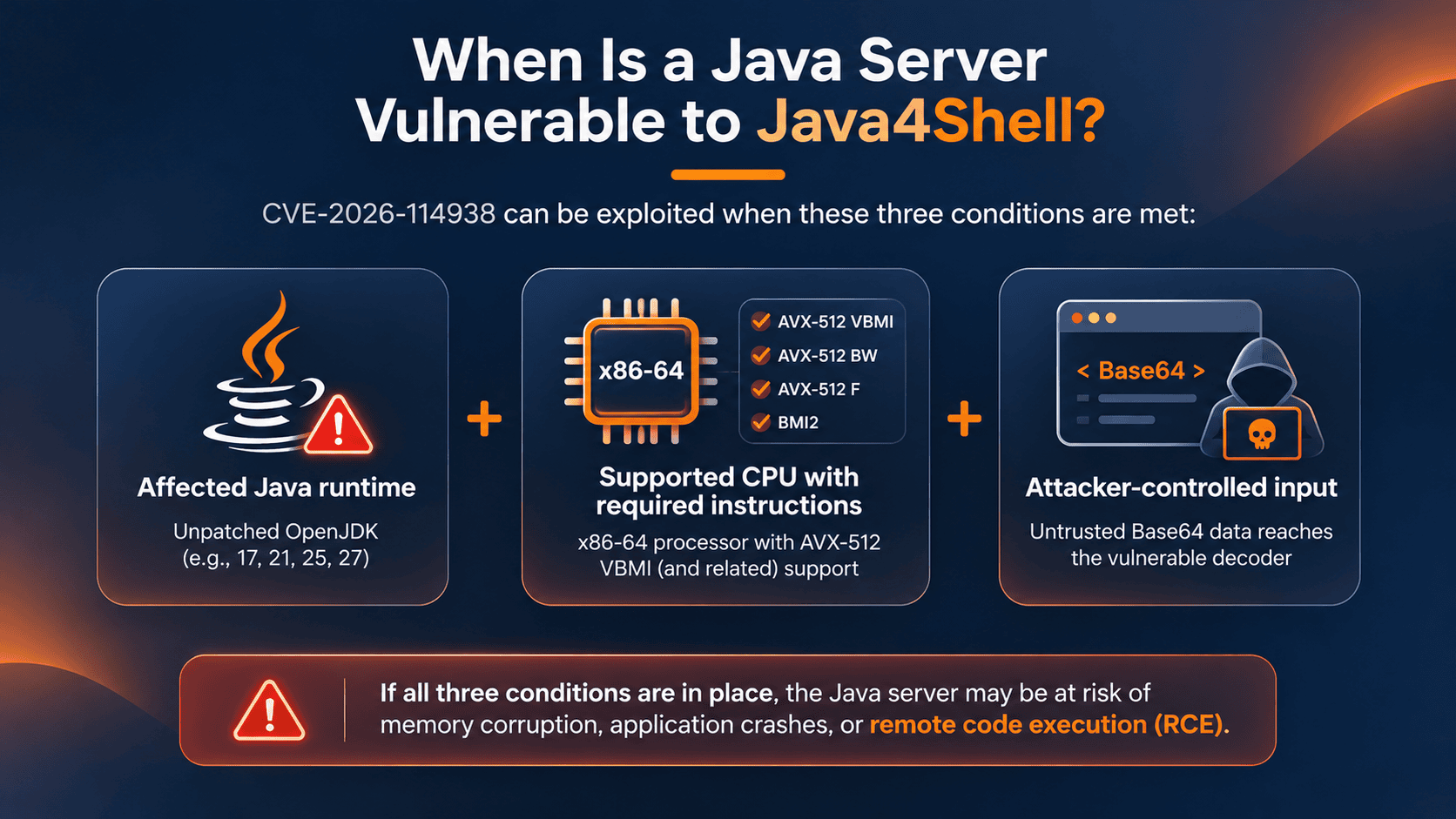
Before assuming that every Java server is exposed, check the conditions that make this vulnerability exploitable.
Three things matter.
First, the application must use an affected Java runtime without the security fix.
Second, the JVM must run on an x86-64 CPU with the required instruction-set support, including AVX-512 VBMI, while the vulnerable optimization is enabled.
Third, attacker-controlled Base64 data must reach the affected decoder.
Let's examine these conditions from a Linux administrator's perspective.
Step 1: Check your Java version
Start with:
java -version
You might see output similar to:
openjdk version "17.0.21" 2026-10-20
OpenJDK Runtime Environment
OpenJDK 64-Bit Server VM
This example shows a Java 17 release that requires further investigation.
Remember that java -version only reports the executable selected by your current shell.
A production service may use a different Java installation.
On Linux, you can inspect running Java processes with:
ps -eo pid,args | grep '[j]ava'
You can also inspect a specific process:
readlink -f /proc/<PID>/exe
Replace <PID> with the Java process ID.
This helps identify the executable used by the running service, although you still need to verify its vendor and patch level.
For containerized applications, perform these checks inside the relevant container rather than relying on the host's Java installation.
Step 2: Check CPU instruction support
On Linux, inspect the processor flags:
grep -m1 '^flags' /proc/cpuinfo
Look for the following features:
avx512f
avx512bw
avx512vbmi
bmi2
For a simpler check:
for flag in avx512f avx512bw avx512vbmi bmi2; do
  if grep -qm1 -w "$flag" /proc/cpuinfo; then
    echo "$flag: available"
  else
    echo "$flag: not detected"
  fi
done
If all four features are available, the CPU meets the instruction-set requirements described in the advisory.
That doesn't automatically prove the application is vulnerable. The Java version, enabled JVM optimizations, and application input paths still matter.
If the required features are unavailable, the specific vulnerable optimized path is not expected to execute.
ARM64 systems, including AWS Graviton-based instances, are not known to be affected by this flaw.
On virtual machines, remember that the guest operating system may see a different set of CPU features from the physical host.
Step 3: Identify exposed application paths
The next question is less straightforward:
Can an external user supply Base64 data that your application decodes?
Potential entry points include authentication headers, encoded request fields, file uploads, API parameters, and identity tokens.
A public API that accepts encoded content deserves closer inspection than an internal batch process that only decodes trusted files.
But don't assume an application is safe simply because you don't see an explicit Base64 decoder in its source code.
Frameworks, authentication middleware, and dependencies may perform decoding internally.
Review your application's request-handling paths, authentication components, and relevant dependencies.
The objective is to determine whether untrusted input can reach the affected runtime functionality, not merely whether the application uses Base64 somewhere.
How to Fix CVE-2026-114938
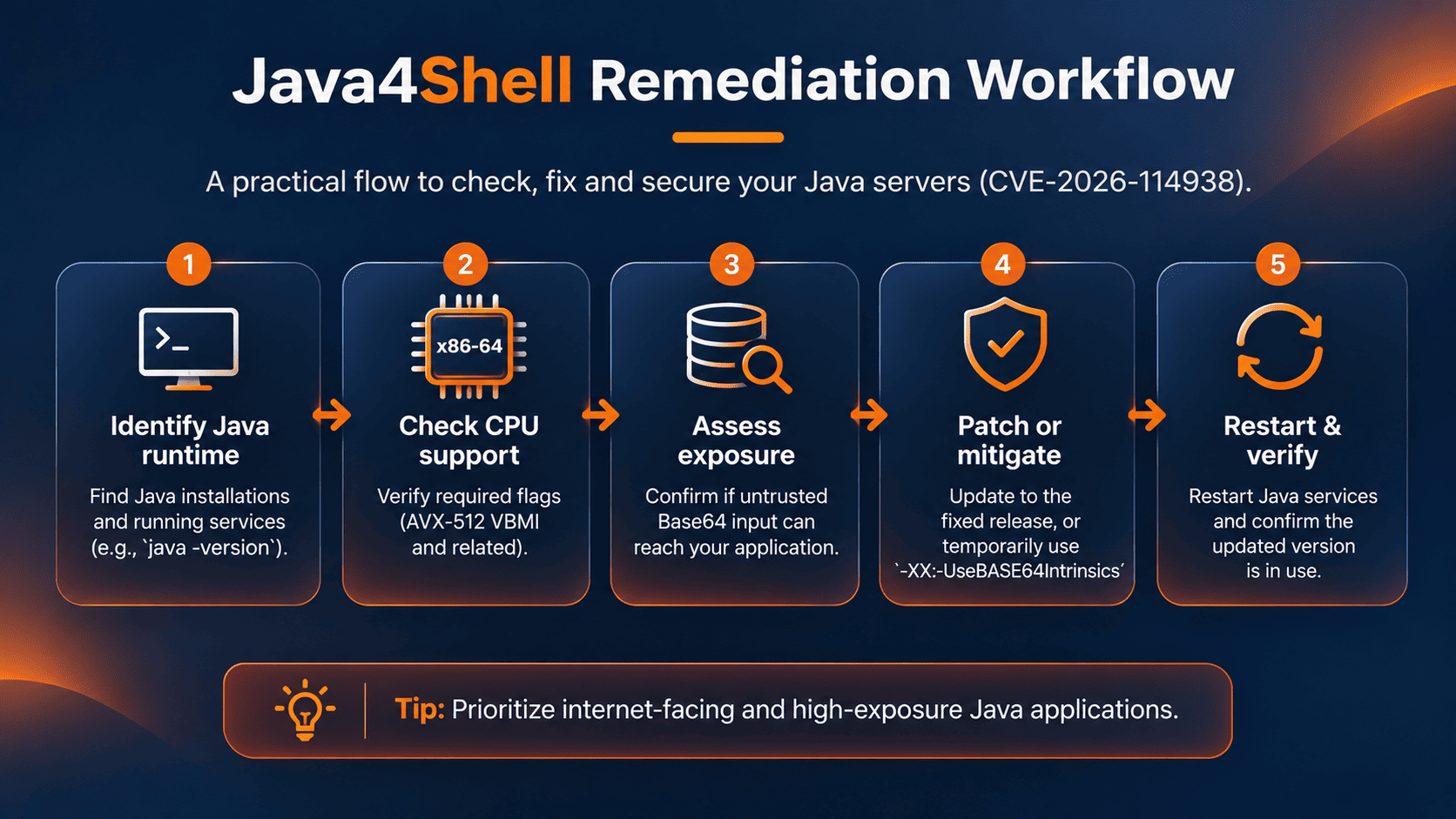
The recommended fix is to update affected Java runtimes to vendor-supported releases containing the security patch.
CISA and CERT-EU both recommend prioritizing internet-facing Java applications.
Before updating, identify the runtime actually used by each service. This includes application servers, background workers, container images, and software packages that bundle Java internally.
On Debian or Ubuntu systems using distribution-managed OpenJDK packages, you can check available updates with:
sudo apt update
apt list --upgradable
On RHEL-compatible systems:
sudo dnf check-update
These commands help identify available package updates. They do not independently confirm that a Java4Shell fix is present.
Check your distribution's advisory and package changelog before considering the vulnerability remediated.
For applications using a separately installed JDK, download the patched release from the appropriate vendor and update the application's runtime configuration.
After updating, restart the affected Java processes.
A package upgrade alone doesn't replace the JVM already loaded into a running process.
Don't forget containers
Containerized Java applications are easy to overlook.
A Kubernetes node might have an updated operating system while its application pods continue running a vulnerable JDK bundled inside an older image.
If your application image contains Java, update the base image or installed JDK, rebuild the application image, and redeploy the workload.
For Kubernetes environments, a rollout may look like:
kubectl rollout restart deployment/my-java-app \
  -n production
This only restarts the deployment using its configured image. It does not rebuild or patch that image.
Make sure the deployment references a fixed image before restarting it.
After rollout, verify the Java version inside the new pods and confirm that the application remains healthy.
What If You Cannot Patch Immediately?
Sometimes a security update can't be deployed immediately.
A production application may require compatibility testing, a maintenance window, or an updated runtime from a third-party vendor.
In those cases, a temporary JVM mitigation can reduce exposure.
The published advisories describe disabling the optimized Base64 implementation with:
-XX:-UseBASE64Intrinsics
This is a JVM startup option, not a command to execute inside a running Java application.
For example:
java -XX:-UseBASE64Intrinsics \
     -jar application.jar
Some Java distributions may require the diagnostic options to be unlocked before accepting this setting. Follow your vendor's instructions and verify that the JVM starts successfully.
This disables the relevant Base64 intrinsic optimization, avoiding the affected hardware-accelerated decoding path.
A second documented option for applicable x86-64 JVMs is:
-XX:UseAVX=2
This restricts the JVM from using AVX-512 instructions, but it may affect performance beyond Base64 decoding. Do not apply this option to ARM64 JVMs, where it may be unsupported.
Neither option should be applied blindly. Test compatibility with your Java build, confirm that the JVM accepts the setting, and measure any relevant performance impact.
You can inspect the Base64 intrinsic flag using:
java -XX:+UnlockDiagnosticVMOptions \
     -XX:+PrintFlagsFinal -version \
     2>&1 | grep UseBASE64Intrinsics
When verifying a running service, inspect its actual JVM startup arguments rather than assuming a flag configured elsewhere has taken effect.
Both mitigations require restarting the affected JVM.
They are temporary risk-reduction measures, not replacements for installing a fixed runtime.
Additional controls such as request validation, input-size limits, and reduced exposure of unauthenticated endpoints can help while patching is underway. However, they should be treated as defense in depth rather than complete protection.
How to Prioritize Your Java Workloads
If you manage dozens or hundreds of Java applications, patching everything simultaneously may not be realistic.
Start with services that are reachable from the internet, especially those processing authentication data, uploaded content, or externally supplied API requests.
Then review internal applications that receive untrusted traffic from other systems.
Pay particular attention to identity services, API gateways, build infrastructure, and applications that bundle their own JVM.
A useful approach is to maintain a short inventory of each workload's Java vendor, runtime version, CPU architecture, patch status, and external exposure.
This makes it easier to distinguish systems that require immediate remediation from those that need further investigation.
It also prevents an all-too-common mistake: updating the system Java package and assuming every application on the machine is now protected.
How to Verify That Your Systems Are Protected
After patching or applying a temporary mitigation, verify the running environment.
Confirm that each affected application uses the intended Java executable and fixed vendor build. Check that services have restarted successfully and that no old JVM processes remain.
For containerized workloads, verify the runtime inside the deployed container rather than only checking the image tag.
Review application logs for unexpected crashes and monitor service health after rollout.
CISA also recommends watching for suspicious Java processes and unexpected JVM crashes.
A crash alone does not establish exploitation, but unusual behavior on an exposed, unpatched service deserves investigation.
Avoid running untrusted public proof-of-concept exploits against production systems. Version verification, vendor advisories, configuration inspection, and controlled testing provide safer ways to assess remediation.
What Java4Shell Teaches Us About Infrastructure Security
The most useful lesson from CVE-2026-114938 goes beyond Java.
We often think about application security in terms of source code, dependencies, and frameworks. But the behavior of an application also depends on its runtime, CPU architecture, operating system, and deployment environment.
A migration to newer hardware can change which optimized code paths become available. A container can carry an outdated runtime long after the host has been patched. A service can continue running vulnerable code even after its package has been upgraded.
None of these problems is visible from a dependency scan alone.
For DevOps and platform engineering teams, this reinforces the importance of maintaining accurate runtime inventories, tracking vendor security updates, and validating the software actually running in production.
If you run Java workloads, don't wait until an application crashes to investigate CVE-2026-114938.
Identify the runtime, check the CPU requirements, review exposure to untrusted input, and apply the appropriate vendor fix.
The safest response isn't panic. It's knowing exactly what you're running and making sure the right systems are patched.
Frequently Asked Questions
Is CVE-2026-114938 the same as Log4Shell?
No. Log4Shell affected the Apache Log4j logging library. Java4Shell affects an optimized Base64 decoding implementation inside certain Java runtimes. They are separate vulnerabilities with different technical causes and affected environments.
Does CVE-2026-114938 affect every Java application?
No. Exposure depends on the Java runtime and patch level, CPU instruction support, whether the vulnerable optimization is active, and whether attacker-controlled Base64 input can reach the affected decoder.
Are ARM64 Java servers affected?
ARM64 systems are not known to be affected by this particular AVX-512-related vulnerability. Administrators should still keep their Java runtimes updated for other security issues.
Can a firewall or WAF completely prevent Java4Shell?
No. Network restrictions and WAF rules may reduce exposure to certain attack paths, but they are not substitutes for patching the vulnerable runtime.
Is disabling Base64 intrinsics a permanent fix?
No. Disabling the affected optimization is a temporary mitigation. Updating to a vendor-supported, fixed Java release is the recommended long-term solution.
References and Further Reading
For the latest technical details, affected versions, and vendor-specific remediation guidance, consult these advisories:
- CVE.org: CVE-2026-114938
- NIST NVD: CVE-2026-114938
- CERT-EU: High Severity Vulnerability in Java SE and OpenJDK
- CISA: Critical Java Vulnerability Requires Immediate Patching
- Red Hat: CVE-2026-114938 Security Bulletin
- Oracle Critical Security Patch Update, November 2026
- Azul: Java4Shell for Zulu and Zing