CVE-2026-109518: Debian and Ubuntu APT Vulnerability Could Allow Root-Level Code Execution
A high-severity flaw in the APT package manager could let attackers bypass package verification and execute malicious code as root. Here's what Debian and Ubuntu administrators need to know.

A routine Linux software update is supposed to strengthen your system's security. But what happens when the very mechanism responsible for installing trusted updates becomes an attacker's entry point?
CVE-2026-109518 exposes a high-severity vulnerability in APT (Advanced Package Tool), the package management system used by Debian, Ubuntu, and many derivative Linux distributions.
Under specific conditions, an attacker capable of manipulating package downloads could bypass APT's normal package verification protections, substitute a malicious Debian package, and potentially execute arbitrary code with root privileges.
The vulnerability was publicly disclosed on November 4, 2026, following its discovery by security researcher Max Justicz. Ubuntu has assigned it a High severity rating with a CVSS 4.0 score of 7.7, and Debian has released security updates addressing the flaw.
For system administrators, DevOps engineers, hosting providers, and organizations managing Linux infrastructure, this vulnerability deserves immediate attention.
The concern isn't simply that a malicious package could be downloaded. It's that a package could be modified after verification and subsequently installed with the highest privileges available on the system.
What Is CVE-2026-109518?
CVE-2026-109518 is a security vulnerability affecting APT, the package manager responsible for installing, updating, and managing software on Debian-based Linux systems.
APT powers familiar commands such as:
sudo apt update
sudo apt upgrade
sudo apt install package-name
Behind these commands, APT performs several security-sensitive operations, including downloading repository metadata, verifying signatures, retrieving packages, and validating their integrity before installation.
Normally, APT relies on cryptographically signed repository metadata and package hashes to ensure downloaded software matches the files published by trusted repositories.
However, CVE-2026-109518 introduces a weakness in how downloaded package files are handled during HTTP redirects and retries.
An attacker positioned between the client and its package repository, or controlling a malicious package mirror or proxy, may exploit this behavior to substitute an attacker-controlled Debian package (.deb).
If that package is subsequently installed, its installation scripts may execute with root privileges.
Vulnerability Overview
| Property | Details |
|---|---|
| CVE ID | CVE-2026-109518 |
| Affected Component | APT Package Manager |
| Affected Systems | Debian, Ubuntu, and potentially derivative distributions |
| Public Disclosure | November 4, 2026 |
| Discovered By | Max Justicz |
| Ubuntu Severity | High |
| CVSS 4.0 Score | 7.7 |
| Attack Vector | Network / On-path manipulation |
| Potential Impact | Arbitrary code execution as root |
| Recommended Fix | Install vendor-provided APT security updates |
Although the vulnerability has a potentially severe impact, exploitation requires specific conditions. A vulnerable APT installation alone does not mean that a system can be compromised remotely without further interaction.
How Does CVE-2026-109518 Work?
Understanding this vulnerability requires examining how APT normally protects software installations.
How APT Normally Verifies Packages
When an administrator installs software, APT follows a process designed to establish trust in the downloaded files.
- APT retrieves repository metadata.
- It verifies the authenticity of signed repository information.
- It downloads the requested package and its dependencies.
- It checks package integrity against trusted metadata.
- The verified packages proceed to installation.
This process helps prevent unauthorized modifications to software distributed through legitimate repositories.
Importantly, repository signatures protect metadata, while cryptographic hashes connect downloaded packages to that verified metadata.
CVE-2026-109518 exploits a weakness in how package files are managed after verification.
The Vulnerability: HTTP Redirects, Retries, and Hard Links
According to Debian's security advisory, APT can merge separate package downloads when HTTP redirects cause them to resolve to the same URI.
The vulnerability involves improper handling of downloaded files when an HTTP download is resumed.
A significant part of the problem involves hard links, which allow multiple filenames to reference the same underlying file data.
Under vulnerable conditions, improper reuse of these links can allow package contents to change after their integrity has already been verified.
An attacker capable of manipulating the download process may exploit this behavior to replace a legitimate package with malicious content.
A Simplified Attack Scenario
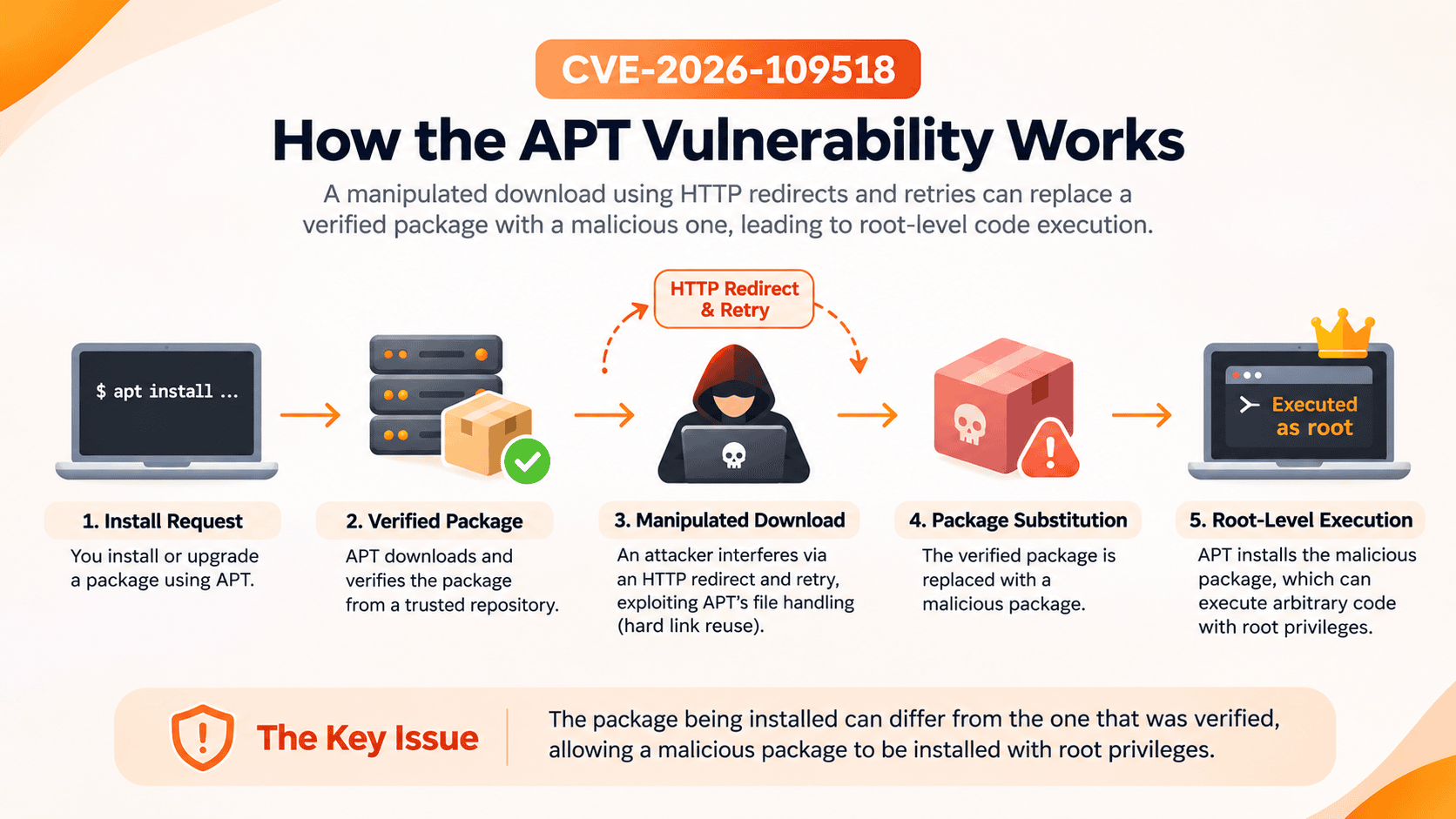
Consider a Linux server installing a software package from an HTTP repository.
Step 1: A legitimate installation begins
An administrator or automated process requests a package installation through APT.
Step 2: An attacker manipulates package delivery
An attacker controlling an intermediary network connection, proxy, or malicious mirror interferes with HTTP responses.
Step 3: Redirect and retry behavior is triggered
The attacker manipulates package delivery to exploit the vulnerable download-handling behavior.
Step 4: Previously verified content is substituted
Improper handling of hard-linked files allows attacker-controlled content to replace package data that APT previously verified.
Step 5: A malicious package is installed
APT may proceed with the substituted package, potentially executing malicious installation scripts with root privileges.
The critical issue is that the package being installed may no longer match the package that passed integrity verification.
This is not a fundamental failure of cryptographic signatures. Instead, it is an implementation flaw that undermines the trust established by those signatures.
Why Is Root-Level Code Execution Dangerous?
Linux uses a privilege model to separate ordinary users and applications from sensitive system operations.
The root account has extensive control over the operating system, including the ability to modify system files, manage services, access protected resources, and change security configurations.
Debian packages can contain installation scripts that execute with elevated privileges.
If an attacker successfully substitutes a malicious package, those scripts could provide a route to extensive system compromise.
Potential consequences include:
- Unauthorized system access: Installation of backdoors or persistent remote-access mechanisms.
- Credential theft: Exposure of API keys, application secrets, and credentials accessible to the compromised system.
- Data compromise: Unauthorized access to sensitive application files, databases, or configuration data.
- Service disruption: Modification, termination, or manipulation of critical services.
- Security control manipulation: Changes to firewall rules, monitoring agents, and security configurations.
These are potential outcomes of successful exploitation, not evidence that every affected system has been compromised.
For organizations managing multiple Linux servers, the impact could extend beyond a single machine, particularly when privileged infrastructure or deployment environments are involved.
Which Debian and Ubuntu Versions Are Affected?
Exposure depends on the installed APT version, repository transport, and configured download retry behavior.
Ubuntu identifies version 22.04 LTS and newer as affected under their default configuration.
Older Ubuntu releases may also be vulnerable when download retries have been explicitly enabled.
Debian 12 and newer likewise use a nonzero retry configuration by default.
Ubuntu Fixed Versions
According to Ubuntu's security documentation, the following APT versions contain the security fix:
| Ubuntu Release | Fixed APT Version |
|---|---|
| Ubuntu 26.10 | 3.3.3ubuntu0.1 |
| Ubuntu 26.04 LTS | 3.2.1ubuntu0.1 |
| Ubuntu 24.04 LTS | 2.8.4ubuntu0.1 |
| Ubuntu 22.04 LTS | 2.4.15ubuntu0.1 |
| Ubuntu 20.04 LTS | 2.0.12+esm1 |
| Ubuntu 18.04 LTS | 1.6.19+esm1 |
| Ubuntu 16.04 LTS | 1.2.36+esm1 |
| Ubuntu 14.04 LTS | 1.0.1ubuntu2.24+esm4 |
Older Ubuntu releases may require Ubuntu Pro or Expanded Security Maintenance coverage to receive the corresponding updates.
Debian Fixed Versions
Debian Security Advisory DSA-6607-1 confirms that the vulnerability has been addressed in:
Debian 13 (Trixie): APT version 3.0.4
Administrators using Debian 12, Debian 11, or other release branches should consult the official Debian Security Tracker for release-specific package status.
Security fixes may be backported without changing the upstream version number significantly. Therefore, comparing version numbers across different distributions or release branches can be misleading.
Users of derivative distributions should follow security advisories published by their respective maintainers.
How to Check Whether Your Linux System Is Vulnerable
Administrators can perform several checks to identify potentially affected systems.
Step 1: Identify Your Linux Distribution
Run:
cat /etc/os-release
This displays the distribution name and release information.
Step 2: Check the Installed APT Version
Run:
apt-cache policy apt
The output displays the currently installed APT version and the available candidate version.
Compare the installed version against the security advisory for your specific distribution release.
Step 3: Inspect APT Download Retry Settings
The reported vulnerability requires download retries to be enabled.
Check the effective configuration using:
apt-config dump | grep -i 'Acquire::Retries'
A nonzero value indicates that retries are configured.
For example:
Acquire::Retries "3";
Disabling retries can prevent the reported retry-dependent exploitation path, but it does not replace installing the security update.
Step 4: Check Repository Transport
Inspect configured package repository URLs:
grep -RhE 'http://|https://' \
  /etc/apt/sources.list \
  /etc/apt/sources.list.d/ 2>/dev/null
APT supports both traditional .list files and newer .sources files.
Repositories using unencrypted HTTP are particularly relevant because an attacker capable of intercepting HTTP traffic may manipulate package delivery.
Properly validated HTTPS protects against ordinary on-path modification of repository traffic.
However, HTTPS alone does not eliminate every possible malicious repository or package delivery scenario.
How to Fix CVE-2026-109518
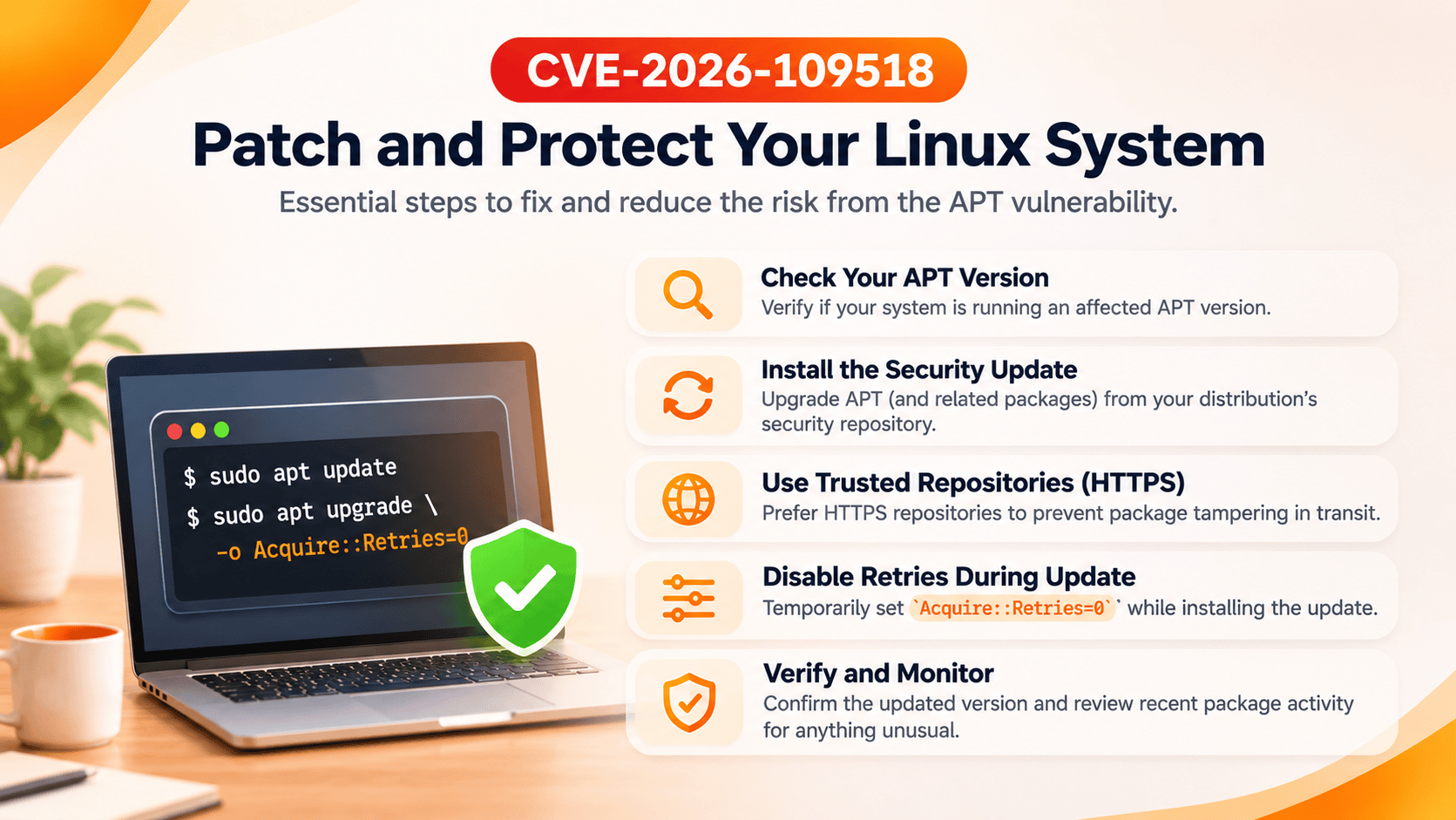
The recommended solution is to install the security updates provided by Debian, Ubuntu, or your distribution maintainer.
Because the vulnerability affects the package management mechanism itself, administrators should take additional precautions while applying updates.
Method 1: Install Security Updates
On Ubuntu, Canonical recommends temporarily disabling download retries during remediation.
Run:
sudo apt update
sudo apt upgrade -o Acquire::Retries=0
For a targeted upgrade of packages built from the APT source package, Ubuntu also documents:
sudo apt update
sudo apt install -o Acquire::Retries=0 \
  --only-upgrade '?source-package(^apt$)'
For Debian systems, install the security updates available for your release, using the same retry mitigation where appropriate.
Important: If you suspect that your network connection or package mirror is compromised, establish a trusted update path before proceeding. Disabling retries mitigates the reported flaw but does not protect against every possible package delivery attack.
Method 2: Prefer HTTPS Repositories
Review your repository configurations in:
/etc/apt/sources.list
/etc/apt/sources.list.d/
Where supported, replace official repository URLs using:
http://
with:
https://
Then refresh package metadata:
sudo apt update
Verify repository compatibility before changing URLs, especially when using third-party mirrors.
HTTPS provides an additional layer of protection against network interception and modification, but it should complement rather than replace APT's package verification mechanisms.
Method 3: Temporarily Disable Download Retries
If immediate patching is not possible, temporarily disable retries for package installation commands:
sudo apt -o Acquire::Retries=0 install package-name
Replace package-name with the intended package.
This prevents the retry-dependent behavior required for the reported attack during that invocation.
However, it is only a temporary mitigation.
Method 4: Verify the Security Update
After patching, check the installed version:
apt-cache policy apt
Compare the output against the fixed package version published by your distribution.
For production infrastructure, also verify that automated deployment systems, container images, and reusable server templates include patched packages.
Updating a running server does not automatically update older images or snapshots used to deploy new systems.
How to Investigate Possible Exploitation
Applying the security update prevents future exploitation of the patched vulnerability, but it cannot undo a compromise that may have occurred previously.
Organizations managing sensitive infrastructure should review relevant package installation activity during the potential exposure period.
Review APT Installation History
Inspect the APT history log:
sudo less /var/log/apt/history.log
To review installation and upgrade entries across rotated logs:
sudo zgrep -hE 'Install:|Upgrade:' \
  /var/log/apt/history.log*
Look for unexpected package installations, unusual installation times, or changes that do not correspond to approved maintenance activities.
Review Package Installation Records
Inspect dpkg logs:
sudo zgrep -hE ' install | upgrade ' \
  /var/log/dpkg.log*
These records may help reconstruct package installation activity.
However, successful exploitation does not necessarily produce a distinctive log entry identifying the malicious substitution.
Investigate Suspicious System Changes
Review unexpected privileged services, unfamiliar executables, unauthorized scheduled tasks, and modifications to sensitive system configurations.
Where centralized monitoring is available, correlate package installation events with network activity, endpoint alerts, and privileged process execution.
Important: The presence of an affected APT version or HTTP repository does not prove exploitation occurred.
Likewise, the absence of suspicious package logs does not guarantee that a system was never compromised.
If compromise is suspected, preserve evidence, investigate using trusted tools, rotate potentially exposed credentials, and consider rebuilding affected systems from verified images.
What CVE-2026-109518 Means for Cloud Hosting and DevOps
The significance of this vulnerability extends beyond individual Linux installations.
APT is widely used in cloud provisioning, virtual private servers, container builds, CI/CD pipelines, and automated infrastructure maintenance.
A vulnerability in a trusted package installation mechanism creates additional risks wherever software is installed automatically.
Cloud Servers and VPS Infrastructure
A compromised package installation could expose application credentials, modify system services, or affect workloads running on the compromised system.
Administrators should prioritize patching infrastructure that frequently performs package installations or automated updates.
CI/CD Pipelines and Build Environments
Build pipelines often install operating system dependencies before compiling, testing, or deploying applications.
Organizations should review build agents, base images, repository configurations, and package installation procedures.
A successful compromise of a privileged build environment could potentially affect generated artifacts or expose deployment credentials.
Containers and Reusable Images
Container images based on affected Debian or Ubuntu releases may contain vulnerable APT packages.
Although compromising a container does not automatically provide root access to the underlying host, exploitation could affect the container or its build environment.
Rebuilding images from patched base images and verifying installed package versions helps reduce this risk.
Managed Infrastructure and Automation
Organizations managing numerous Linux systems should maintain reliable processes for identifying affected assets and deploying security updates.
Useful safeguards include centralized asset inventories, vulnerability assessments, controlled patch deployment, trusted repositories, and consistent monitoring.
The objective is not simply to respond to one CVE, but to reduce the time between vulnerability disclosure and effective remediation.
Frequently Asked Questions
Is CVE-2026-109518 remotely exploitable?
Yes, under specific conditions. An attacker capable of manipulating HTTP package traffic or controlling a malicious mirror or proxy may exploit the vulnerability during package installation involving redirects and download retries. It does not automatically compromise every reachable Linux server.
Does CVE-2026-109518 affect Ubuntu 24.04 LTS?
Yes. Ubuntu 24.04 LTS is among the affected releases. Canonical identifies APT version 2.8.4ubuntu0.1 as containing the security fix.
Does HTTPS prevent this vulnerability?
Properly validated HTTPS protects against ordinary on-path modification of package downloads. However, installing the security update remains necessary because HTTPS does not eliminate every malicious repository or package delivery scenario.
Are Snap packages affected?
No. Canonical states that software installations through Snap are not affected because Snap uses a different package management system.
Is running apt update alone dangerous?
The reported exploitation path requires an attempted Debian package installation. The apt update command primarily refreshes repository metadata and does not itself install downloaded Debian packages.
Should administrators disable automatic updates?
No. Disabling automatic security updates is not the recommended solution. Instead, administrators should install the vendor patch, use trusted repositories, and apply appropriate temporary mitigations during remediation.
Final Thoughts: When the Update Mechanism Becomes the Weakness
CVE-2026-109518 highlights an important reality of modern infrastructure security: even trusted security mechanisms depend on the correctness of the software implementing them.
APT's repository verification model is designed to protect Linux systems against malicious or altered packages. Yet improper handling of files during redirects and download retries created a path around those protections.
For Linux users, the immediate priority is straightforward: identify affected systems, install the appropriate security updates, and verify that remediation is complete.
For DevOps teams, cloud providers, and infrastructure administrators, the broader lesson is equally important.
Security cannot depend on a single trusted mechanism. It requires layered protections, controlled software delivery, reliable patch management, and the ability to detect unexpected changes.
At ShellSecrets, we believe secure infrastructure begins with proactive maintenance, reliable monitoring, and carefully managed systems.
Whether you operate a single VPS or manage a distributed production environment, keeping the underlying operating system and its package management tools secure is essential to protecting your applications, services, and data.
Stay patched. Verify your infrastructure. Never assume a trusted update mechanism is beyond scrutiny.
References and Further Reading
For official vulnerability details, affected releases, and updated remediation guidance, refer to the following sources: