phpAfterShell (CVE-2026-126714): Why Your PHP Server Needs Another Security Update
Patched PHP2Shell in October? Your server may still be exposed. Learn how phpAfterShell works and how to secure affected PHP workloads.

If you updated PHP after the PHP2Shell vulnerabilities in October, you probably thought the urgent work was behind you.
Unfortunately, there's another issue to address.
On November 19, 2026, PHP released another round of security updates, including a fix for phpAfterShell (CVE-2026-126714), a critical vulnerability in PHP's default file-based session handling.
The vulnerability has been assigned a CVSS 4.0 score of 9.2 (Critical) and can potentially lead to remote code execution under specific conditions.
What makes this discovery particularly concerning is its relationship with PHP2Shell. The earlier updates addressed important security weaknesses, but subsequent research uncovered another way for manipulated session data to survive an interrupted write.
That means a PHP server patched in October may still need another security update.
For developers, sysadmins, and hosting providers, understanding this distinction matters more than simply recognizing another CVE number.
What Is phpAfterShell?
phpAfterShell is a vulnerability in how PHP updates sessions stored as files.
PHP sessions allow applications to maintain state between requests. They commonly hold information such as login status, user preferences, shopping cart contents, and temporary application data.
By default, PHP can store this information in files on the server.
When a session changes, PHP serializes the updated data and writes it back to the corresponding session file.
Normally, this happens without the application developer needing to think about the underlying file operations.
The problem arises when a session write is interrupted at a particular point.
Instead of leaving either the original session or the fully updated session intact, the file can contain a mixture of both.
Researchers demonstrated that carefully constructed session data can cause this mixed content to be interpreted differently when PHP reads the file again.
Under exploitable conditions, that can introduce attacker-controlled objects into the application's session state.
If those objects can trigger a suitable deserialization chain, the result may be remote code execution.
This isn't simply an application forgetting to validate a form field. The underlying weakness exists in PHP's own session storage implementation.
How Is phpAfterShell Related to PHP2Shell?
The names are similar, but the vulnerabilities are not identical.
In October 2026, PHP2Shell referred to two critical vulnerabilities, CVE-2026-109618 and CVE-2026-109619, involving memory-safety problems in PHP's request and error handling.
The October security releases also restricted object creation during session upload-progress processing, addressing an important part of the exploitation surface.
But the session file itself was still being updated through operations that could leave partial changes behind if interrupted.
Researchers at depthfirst investigated this behavior after the original fixes.
They discovered that preventing unsafe object creation during an upload-progress callback wasn't enough to prevent malicious session data from being created.
The dangerous object data could remain on disk and become active later, when an ordinary application request loaded the session.
In other words, the original protection addressed what could happen during one stage of request processing. phpAfterShell demonstrated a different problem involving the state left behind for subsequent requests.
The October PHP2Shell patches do not fix CVE-2026-126714.
This is the most important detail for administrators who already updated their servers last month.
How Does the Vulnerability Work?
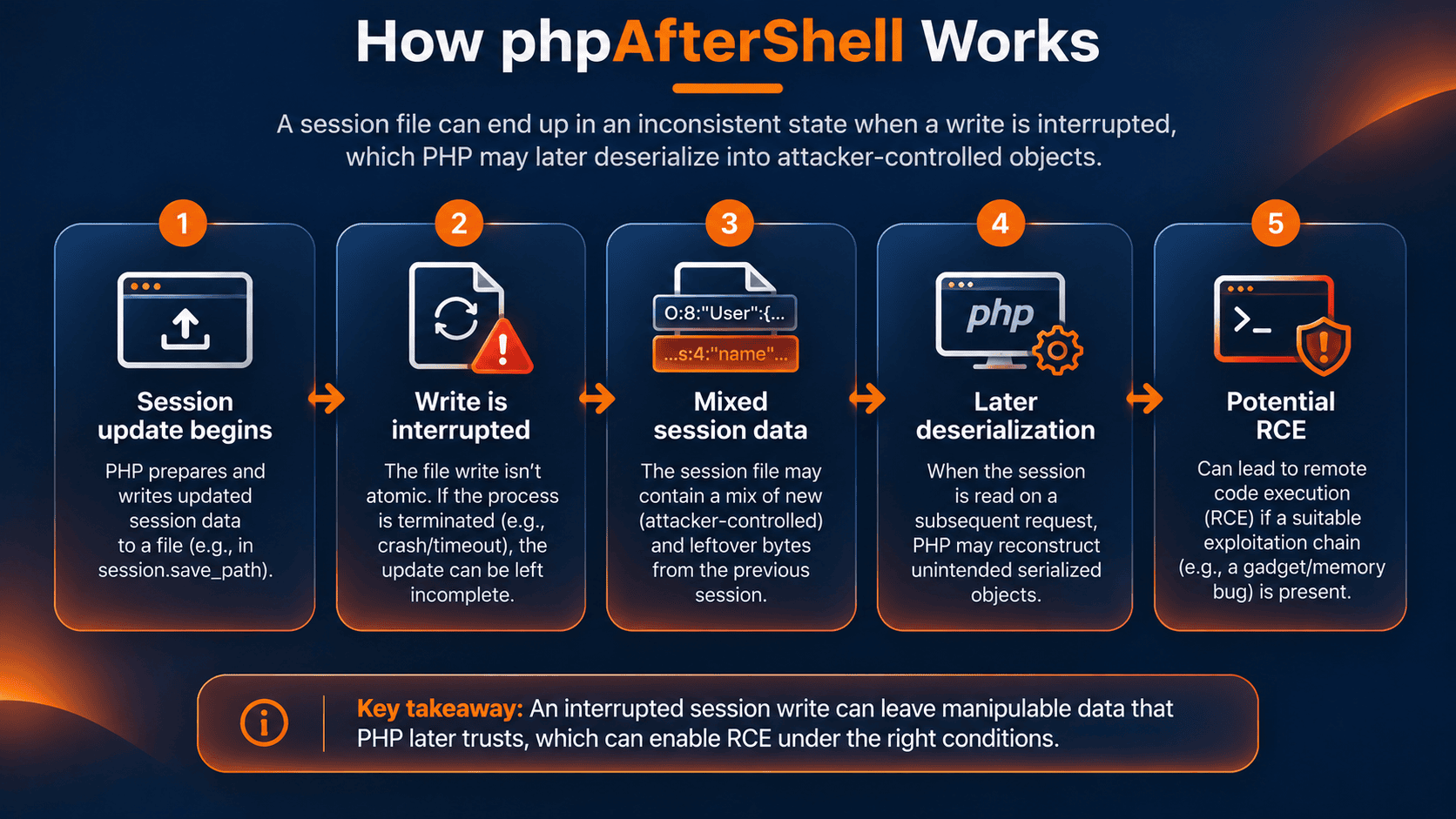
To understand the issue, it helps to know what happens when PHP processes an uploaded file.
PHP supports a feature called session upload progress. When enabled, it can track the progress of an HTTP multipart upload and record that information in the user's session.
Some of this processing happens before the application's PHP script begins executing.
That means PHP itself may open, modify, and save session data while it is still handling the incoming request.
The researchers found that the file update operations involved are not atomic. If the worker is terminated during a write, the session file may contain the beginning of the new data followed by leftover bytes from the previous contents.
When PHP subsequently reads that session, it may interpret the combined bytes as valid serialized values that were not present in either intended session state.
The result is a form of session data manipulation that can lead to object deserialization.
Remote code execution isn't guaranteed merely because a session file becomes corrupted. The attack also needs a suitable execution path, such as an exploitable deserialization gadget chain.
In their research, depthfirst demonstrated code execution by combining the session manipulation with a separate memory-corruption issue involving a PHP-native class.
The researchers have not publicly disclosed all details of that second issue.
The broader lesson is that session files aren't just passive storage. Once an application reads them back, their contents influence what PHP reconstructs in memory.
Which PHP Versions Are Vulnerable?
The PHP project released patched versions on November 19, 2026.
| PHP branch | Affected upstream releases | Fixed version |
|---|---|---|
| PHP 8.2 | Earlier than 8.2.36 | 8.2.36 |
| PHP 8.3 | Earlier than 8.3.37 | 8.3.37 |
| PHP 8.4 | Earlier than 8.4.28 | 8.4.28 |
| PHP 8.5 | Earlier than 8.5.13 | 8.5.13 |
| PHP 8.6 | Affected release candidates | 8.6.0 |
PHP 8.1 and older branches are end-of-life. Although certain older maintenance branches may not contain this particular defect, unsupported PHP installations remain exposed to other security problems.
Moving to a supported PHP version is strongly recommended.
The version table applies to upstream PHP releases. Linux distributions may backport security fixes without adopting the same version numbers.
Always verify your installed package against the relevant distribution or vendor advisory.
Is Your Website or Server Affected?
The most important factors are your PHP version and how your application stores sessions.
phpAfterShell affects the default file-based session handler, commonly configured as:
session.save_handler = files
Applications using Redis, a database, or another non-file session handler are not affected by this specific file-writing defect.
However, that doesn't mean those applications are protected against every vulnerability fixed in the November PHP releases.
The disclosure includes other security issues with different conditions.
For a typical Linux web server, start by identifying the PHP version and session configuration.
Step 1: Check your PHP version
Run:
php -v
This displays the version used by the command-line PHP executable.
For example:
PHP 8.4.27 (cli)
PHP 8.4.27 includes the October PHP2Shell fixes but predates the November phpAfterShell patch.
However, your website may not use the same PHP executable as your terminal.
Servers can have multiple PHP installations, different PHP-FPM pools, and separate runtimes for individual websites.
Make sure you identify the PHP version actually handling web requests.
Step 2: Check the session storage configuration
Run:
php -i | grep -E \
'^(session.save_handler|session.save_path|session.upload_progress.enabled)'
Example output:
session.save_handler => files => files
session.save_path => /var/lib/php/sessions => /var/lib/php/sessions
session.upload_progress.enabled => On => On
This example indicates file-backed sessions with upload-progress tracking enabled.
It doesn't independently prove that remote code execution is possible.
The exact exposure depends on the runtime, application behavior, and whether the necessary exploitation conditions can be reached.
Also remember that PHP CLI and PHP-FPM may load different configuration files.
To identify the CLI configuration, use:
php --ini
For PHP-FPM, inspect the active pool and service configuration, including any settings that override php.ini.
What about WordPress and Laravel?
A website isn't automatically vulnerable simply because it uses WordPress, Laravel, or another PHP framework.
The vulnerability is in the PHP runtime, but exposure to this specific flaw depends on the session storage mechanism and relevant request-processing behavior.
Frameworks may use different session handlers, and applications can override the defaults.
Rather than assuming a framework is safe or unsafe, verify the runtime and actual session configuration.
How to Fix phpAfterShell
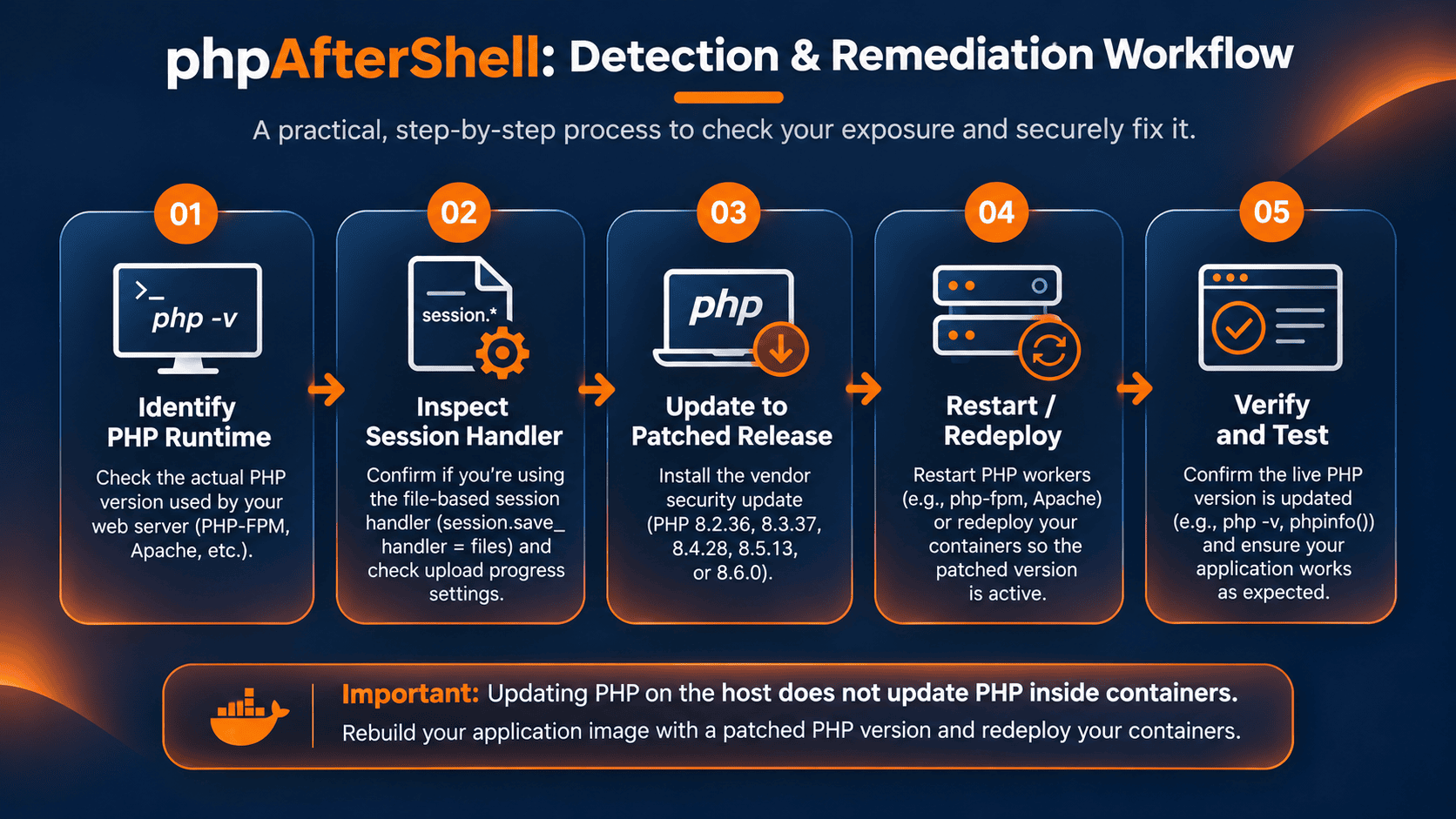
The recommended solution is to upgrade PHP to a release containing the November 19 security fixes.
For supported upstream branches, that means PHP 8.2.36, 8.3.37, 8.4.28, or 8.5.13.
PHP 8.6.0 also includes the fixes.
On Debian or Ubuntu systems, check for available PHP package updates:
sudo apt update
apt list --upgradable | grep php
On RHEL-compatible systems:
sudo dnf check-update
These commands identify available package updates. They don't prove that your distribution has published the required security fix.
Review the vendor advisory and package changelog before updating.
Once the appropriate packages are installed, restart the relevant PHP service so the running workers use the updated binary.
For example, on a system running PHP 8.4-FPM:
sudo systemctl restart php8.4-fpm
The actual service name depends on your operating system and PHP installation.
If PHP runs through Apache's embedded module, restarting Apache may be necessary instead.
Don't overlook Docker and Kubernetes
Updating PHP on the host won't fix an application running inside a container with an older PHP runtime.
Update the container base image, rebuild your application image, and redeploy the workload.
Avoid assuming that a mutable image tag such as php:8.4-fpm guarantees the latest security fixes are already running.
Verify the PHP version inside the deployed container.
For Kubernetes, ensure the deployment references a rebuilt, patched image before rolling out new pods.
The important thing is to confirm what is actually running in production, not simply what version appears in a Dockerfile.
Temporary Mitigation If You Cannot Patch Immediately
If your application doesn't require PHP's session upload-progress feature, you can disable it temporarily.
Add the following setting to the PHP configuration used by your web workers:
session.upload_progress.enabled = 0
Then restart the relevant PHP service.
This removes the most straightforward upload-progress exploitation path described by the researchers.
However, disabling upload progress does not repair the underlying session file-writing vulnerability.
Applications that store large amounts of attacker-controlled data in sessions may expose other paths to session manipulation.
Until the patch can be installed, minimize untrusted data stored in session state and review the application's session handling.
Switching to a properly configured non-file session handler can also remove exposure to this specific defect, but changing session storage is an application-level change that requires testing.
A WAF may help reduce certain malicious requests, but it cannot guarantee protection against this vulnerability.
Treat these measures as temporary safeguards while preparing the security update.
How to Verify the Fix
After upgrading, confirm the version used by your actual PHP web workers.
Check that the expected PHP-FPM or Apache services restarted successfully and that no older workers remain active.
For containerized applications, verify the PHP version inside the running container.
You should also inspect the active session configuration and confirm that your application continues to handle authentication, uploads, and session persistence correctly.
If you've disabled upload progress as a temporary mitigation, make sure that setting was applied to the web runtime rather than only the CLI.
Avoid running untrusted proof-of-concept code against production systems.
Vendor advisories, runtime inspection, package verification, and controlled testing are safer ways to establish whether remediation has been completed.
What phpAfterShell Means for Hosting and DevOps Teams
The most interesting lesson from phpAfterShell isn't simply that PHP had another serious vulnerability.
It's how an apparently small detail in runtime behavior can become a security boundary.
A session write that doesn't complete cleanly may leave behind data that is valid enough for the application to trust, but different from what the application intended to store.
This is particularly relevant to hosting providers and platform teams managing large numbers of PHP websites.
A server can host several applications using different PHP versions, different FPM pools, and different session configurations.
One application may be updated while another continues using a vulnerable runtime.
The same problem appears in container environments, where updating the host has no effect on an outdated PHP image.
Accurate runtime inventories, consistent patching, and verification of deployed services matter more than ever.
The November security release also fixes several other serious PHP vulnerabilities. Administrators should therefore treat it as a broader runtime security update, not only a response to phpAfterShell.
Final Thoughts
phpAfterShell is a reminder that applying one security patch doesn't mean every related weakness has been eliminated.
The October PHP2Shell fixes addressed serious problems, but further research uncovered a separate vulnerability in how PHP manages file-backed sessions.
The good news is that fixed PHP releases are already available.
If you operate PHP websites, especially on shared hosting, VPS, or self-managed servers, now is the time to check your runtime versions and session configuration.
Don't stop at confirming that you patched PHP2Shell. Verify that your servers also contain the November phpAfterShell fixes.
A few minutes spent checking your PHP environment today may prevent a much more expensive security incident tomorrow.
Frequently Asked Questions
Is phpAfterShell the same as PHP2Shell?
No. PHP2Shell refers to critical vulnerabilities disclosed in October 2026. phpAfterShell, tracked as CVE-2026-126714, is a separate vulnerability involving interrupted writes to file-backed PHP sessions.
Does patching PHP2Shell protect against phpAfterShell?
No. The October PHP security releases do not include the phpAfterShell fix. Administrators must install the November 19 security updates or equivalent vendor-patched packages.
Does phpAfterShell affect WordPress websites?
A WordPress website can be exposed if its PHP runtime and session configuration meet the vulnerable conditions. WordPress itself is not the root cause, and not every WordPress installation uses PHP's file-based sessions.
Is disabling session upload progress enough?
No. Disabling session.upload_progress.enabled removes an important exploitation path, but it is only a temporary mitigation. Updating PHP remains the recommended solution.
Which PHP versions fix CVE-2026-126714?
The fixed upstream versions are PHP 8.2.36, 8.3.37, 8.4.28, 8.5.13, and 8.6.0. Distribution-maintained packages may contain equivalent backported fixes.
References and Further Reading
For technical details, affected versions, and vendor-specific remediation guidance, consult these authoritative sources:
- CVE.org: CVE-2026-126714 Official Record
- PHP Security Advisory: Partially Overwritten Session Files Can Lead to Remote Code Execution
- PHP.net: Official November 2026 Security Releases
- depthfirst: phpAfterShell Technical Research and Root Cause Analysis
- Red Hat: CVE-2026-126714 Security Advisory
- Ubuntu Security: CVE-2026-126714